HPOS sounds like a performance setting.
It is actually a fundamental change to how WooCommerce stores orders.
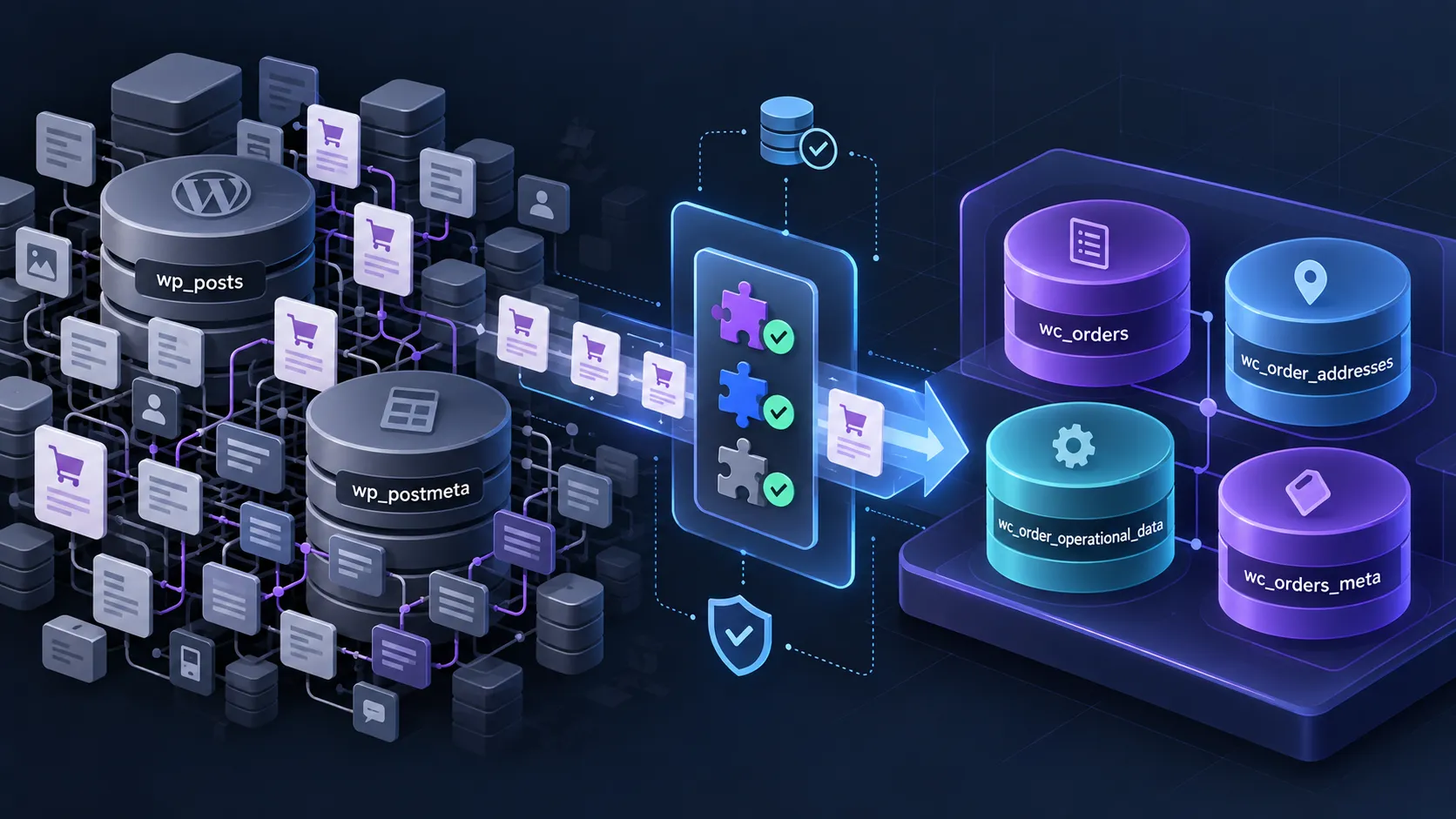
High-Performance Order Storage, usually shortened to HPOS, moves core WooCommerce order data away from the general-purpose WordPress posts and postmeta tables and into dedicated WooCommerce order tables.
That matters for performance and scalability.
It also matters for plugins and custom code.
For years, developers could treat a WooCommerce order almost like any other WordPress post. Code could query wp_posts, read wp_postmeta, call functions such as get_post_meta(), or run SQL directly against those tables.
With HPOS, that assumption is no longer safe.
WooCommerce has provided its own order APIs for years, and extensions that use those APIs properly can generally work regardless of where the order is physically stored. Plugins that bypass WooCommerce and talk directly to the old WordPress order storage are where compatibility problems become much more likely.
HPOS has been stable and enabled by default on new WooCommerce installations since WooCommerce 8.2.
For an existing store, however, we would not enable it simply because it is the newer architecture.
We would first check the plugin stack, custom code, integrations, backups, and rollback path.
We have migrated existing WooCommerce stores to HPOS ourselves. The stores involved had relatively straightforward extension stacks, the installed plugins were compatible, WooCommerce completed the order migration normally, and we did not need to repair custom code or roll the stores back afterward.
That is reassuring, but it is not evidence that every migration is equally simple.
The more an existing store depends on subscriptions, order-management extensions, ERP integrations, old snippets, or direct database queries, the more carefully we would approach the change.
Last researched: 29 September 2026.
The Short Version
| Question | Practical answer |
|---|---|
| What is HPOS? | WooCommerce's dedicated database storage system for orders |
| Is it standard WooCommerce now? | Yes. HPOS has been the default for new installations since WooCommerce 8.2 |
| Do existing stores have to migrate automatically? | No. Existing stores can migrate when they are ready |
| Can plugins be incompatible? | Yes, particularly plugins that access order data through legacy WordPress storage instead of WooCommerce APIs |
| Will WooCommerce warn me? | Yes. Known incompatible active extensions can prevent HPOS from being enabled |
| Does no warning guarantee compatibility? | No. Compatibility declarations are made by extension developers and important workflows still need testing |
| What is compatibility mode? | A synchronization layer that keeps HPOS and legacy order storage aligned during migration or a transition period |
| Does WooCommerce Subscriptions support HPOS? | Yes, officially, but test the complete subscription workflow on your store |
| Should a small store enable HPOS? | Usually reasonable if the stack is compatible, but do not expect a dramatic speed improvement simply because the switch is enabled |
| Should I enable HPOS directly on production? | Not on an established or complex store without staging, a current backup, and workflow testing |
What Is WooCommerce HPOS?
Before HPOS, WooCommerce used WordPress's normal post system to store orders.
An order was essentially a WordPress custom post.
With the default WordPress table prefix, the main order record lived in:
wp_posts
and much of its additional data lived in:
wp_postmeta
That design made sense when WooCommerce was younger.
WordPress already had an established API for posts and metadata. WooCommerce could use that infrastructure instead of creating an entirely separate storage layer.
But ecommerce orders are not really blog posts.
An order can have:
- billing information,
- shipping information,
- payment data,
- currency,
- totals,
- taxes,
- order status,
- customer information,
- custom metadata,
- operational flags,
- links to refunds and subscriptions,
- data required by third-party extensions.
On a mature WooCommerce store, that can mean a very large number of records being added to and queried from tables that are also responsible for pages, posts, products, revisions, attachments, and other WordPress content.
HPOS gives WooCommerce a storage model designed specifically around orders instead.
WooCommerce describes the goals of HPOS around scalability, reliability, and simplicity, with dedicated tables and indexes reducing the amount of order work going through the general WordPress post tables.
The important idea is simple:
HPOS stops treating the core WooCommerce order as a WordPress post and gives orders their own purpose-built database structure.
That is the architectural change behind everything else in this guide.
WooCommerce's current HPOS documentation is the primary reference for the merchant-facing migration process.
The Four Main HPOS Order Tables
HPOS introduces four primary tables for order data.
Assuming the normal wp_ database prefix, they are:
| Table | Main purpose |
|---|---|
wp_wc_orders |
Core order information |
wp_wc_order_addresses |
Billing and shipping addresses |
wp_wc_order_operational_data |
Internal operational order fields |
wp_wc_orders_meta |
Additional order metadata |
WooCommerce installs these using the site's actual database prefix, so a site with a custom prefix will not literally use wp_.
The main wc_orders table can contain important order fields directly instead of spreading almost everything across generic post metadata.
Addresses receive their own structured table.
Operational information that WooCommerce changes frequently is separated from the main order record.
And there is still an order-meta table for information that does not belong in the core schema.
This is more appropriate for ecommerce than turning every order property into another row in wp_postmeta.
HPOS does not replace every WooCommerce order-related table
One detail is worth clarifying.
WooCommerce already had dedicated tables for certain order information before HPOS.
For example, order line items continue to use the existing woocommerce_order_items and woocommerce_order_itemmeta tables.
HPOS primarily changes where the order itself and its associated core/meta information are stored.
So the migration is not simply:
every old WooCommerce table → four new tables.
It is specifically a redesign of the core order datastore.
Why Did WooCommerce Change Order Storage?
The legacy approach creates several scaling problems.
If every order adds one post plus many metadata records, a busy store can accumulate an enormous postmeta table.
That table is also used by the rest of WordPress.
HPOS lets WooCommerce:
- index important order fields more appropriately,
- reduce the number of database operations required for common order tasks,
- isolate order workloads from general WordPress content,
- create more efficient order queries,
- evolve its order architecture without forcing everything through the WordPress posts API.
WooCommerce has published HPOS performance benchmarks showing substantial gains in synthetic order creation and querying scenarios.
Those results explain why the architecture exists.
They should not be interpreted as a promise that enabling HPOS will make every real store several times faster or cut every checkout time by a fixed percentage.
Real WooCommerce performance also depends on:
- payment gateways,
- shipping calculations,
- tax services,
- plugins,
- external API calls,
- hosting,
- object caching,
- frontend scripts,
- the size and shape of the database.
That distinction becomes especially important for small stores.
Why Plugins Can Be Incompatible With HPOS
A properly written WooCommerce extension should normally ask WooCommerce for an order.
For example:
$order = wc_get_order( $order_id );
WooCommerce then decides which datastore contains that order.
The plugin does not need to care whether the data ultimately came from legacy WordPress tables or HPOS tables.
That abstraction is the important part.
Problems appear when plugins bypass it.
Older WooCommerce code may instead do things such as:
$email = get_post_meta( $order_id, '_billing_email', true );
or:
update_post_meta( $order_id, '_my_custom_value', $value );
or query shop_order records with WP_Query.
Some integrations go even further and run direct SQL against wp_posts or wp_postmeta.
Those approaches were possible because an order really was stored there.
Under HPOS, those legacy tables may no longer contain the authoritative version of the order.
WooCommerce's HPOS extension recipe book therefore tells extension developers to use WooCommerce-specific APIs rather than relying on WordPress post APIs for order data.
For custom order metadata, the modern pattern looks more like:
$order = wc_get_order( $order_id );

$order->update_meta_data( '_my_custom_value', $value );
$order->save();
And code that needs to find orders should generally work through wc_get_orders() or WC_Order_Query rather than constructing a WordPress post query around shop_order.
This is not merely cleaner code.
It is what allows WooCommerce to change the underlying storage without forcing correctly written integrations to know where an order physically lives.
How to Check Whether Your Plugins Support HPOS
The first place to look is WooCommerce itself.
Go to:
WooCommerce → Settings → Advanced → Features
The Order data storage section shows whether the store currently uses legacy WordPress post storage or HPOS.
WooCommerce extensions can explicitly declare themselves compatible or incompatible with HPOS.
Internally, extensions can make that declaration using WooCommerce's feature compatibility API and the custom_order_tables feature identifier.
If an active extension is known to be incompatible, WooCommerce disables the normal HPOS switch and provides a View and manage option showing the incompatible extensions.
This matches what we have seen while working with HPOS migrations: WooCommerce gives you a useful compatibility gate before allowing the normal switch.
That makes the initial check much easier than manually researching every plugin before even opening the settings screen.
But there is an important limitation.
A Compatibility Declaration Is Not a Certification
WooCommerce describes extension compatibility as self-declared.
The extension developer is responsible for testing the product and declaring whether it supports HPOS.
That is useful.
It is not the same as WooCommerce independently testing every feature of every extension.
WooCommerce's current extension compatibility guidance still recommends manual compatibility testing in addition to declarations.
So we would interpret the signals this way:
Declared incompatible: stop. Do not enable HPOS until the dependency is updated, replaced, removed, or separately resolved.
Declared compatible: good signal. Continue to staging tests.
Uncertain or undocumented: investigate before production.
No visible warning: useful, but not proof that every feature of the stack has been tested.
This is also part of the broader process we describe in How to Evaluate WooCommerce Plugin Quality Before You Install It.
Compatibility is evidence to collect, not a badge to trust blindly.
What Is HPOS Compatibility Mode?
Compatibility mode exists to make migration safer.
An established WooCommerce store can contain years of order history in the legacy posts tables.
WooCommerce therefore provides synchronization between the legacy datastore and the HPOS datastore.
For an existing store, the practical migration flow is:
- keep the current datastore authoritative,
- enable compatibility mode,
- allow WooCommerce to synchronize the two order stores,
- wait until there are no orders pending synchronization,
- switch the authoritative datastore to HPOS,
- test the store,
- keep compatibility mode temporarily if you want an easier rollback window.
WooCommerce's current HPOS enablement guide documents this process.
Synchronization is handled through background actions for normal migrations.
Larger stores can also use WooCommerce's HPOS CLI tools, including:
wp wc hpos status
wp wc hpos sync
wp wc hpos verify_data
The exact approach depends on the size of the store and how much control you need over the migration.
Our own migrations have been uncomplicated: we allowed WooCommerce to finish synchronization and only then switched the order storage.
Authoritative and backup storage
It helps to understand the terminology.
At any moment, one datastore is authoritative.
That is the data WooCommerce actually treats as the current order record.
The other datastore can be kept synchronized during the transition.
When HPOS is authoritative and compatibility mode remains enabled, WooCommerce continues maintaining a legacy representation of order data.
When the store is comfortable operating entirely through HPOS-compatible code, synchronization can eventually be disabled.
Compatibility mode is useful.
It should not be confused with making old, incompatible code permanently safe.
The 2026 Change That Makes Old Custom Code More Important
There is a particularly important HPOS change in 2026.
Starting with WooCommerce 10.7, sync on read is disabled by default.
Sync on read was an additional backwards-compatibility mechanism.
Suppose HPOS was authoritative, but some old plugin ignored WooCommerce's APIs and wrote directly to the legacy wp_posts or wp_postmeta record.
WooCommerce could previously detect during a later read that the legacy record had changed and pull that information back into HPOS.
That was helpful for old integrations.
It was also risky.
WooCommerce explains that stale or unintended modifications in the legacy tables could overwrite newer HPOS information during a read.
WooCommerce therefore disabled sync on read by default in WooCommerce 10.7 and recommends fixing code to use the WooCommerce CRUD layer instead.
Normal compatibility-mode synchronization is not the same thing and continues to work.
The important practical conclusion is:
Do not treat compatibility mode as permanent protection for code that modifies orders incorrectly.
If you inherit an old store in 2026, direct order-table access deserves more attention than it did during the early HPOS transition period.
What Custom Code Should You Check?
Search custom plugins, child themes, Code Snippets, integration code, and old agency utilities for anything that treats an order as a post.
The obvious things to investigate include:
get_post_meta()used with order IDs,update_post_meta()used with order IDs,delete_post_meta()used with order IDs,wp_update_post()used to modify orders,WP_Querysearching forshop_order,get_posts()searching for orders,- direct SQL against
wp_posts, - direct SQL against
wp_postmeta, - assumptions that all order data exists in those legacy tables.
Finding one of these does not automatically mean the code is broken.
Context matters.
But it is a strong reason to review what the code is doing and whether there is a WooCommerce order API for the same operation.
For new WooCommerce development, we would consider direct dependency on the legacy order-post structure technical debt unless there is a very unusual and well-documented reason for it.
What About WooCommerce Subscriptions?
WooCommerce Subscriptions officially supports HPOS.
Its current Subscriptions documentation lists HPOS compatibility, and its data-structure documentation explains that subscriptions are stored as the shop_subscription type in the HPOS wc_orders table when HPOS is active.
There is an important evidence distinction for WP Vetted, though.
We have substantial hands-on experience with WooCommerce Subscriptions on a real store with hundreds of active subscriptions.
That store was not running HPOS.
We therefore do not use that experience as evidence that a complex subscription migration to HPOS is automatically safe.
Our statement that WooCommerce Subscriptions supports HPOS comes from current WooCommerce documentation, not from migrating that particular subscription store ourselves.
And a subscription store should be tested more deeply than a simple one-time-purchase store.
At minimum, we would test:
- new subscription purchase,
- automatic renewal,
- manual renewal where applicable,
- payment-method changes,
- failed renewal,
- cancellation,
- subscription status changes,
- related renewal orders,
- refunds,
- customer account views,
- any custom subscription metadata or integration.
Our Best WooCommerce Subscription Plugins in 2026 guide goes deeper into the recurring-payment ecosystem.
The same caution applies to other extensions that create complex order-like objects or interact deeply with order data.
Keep Order-Related Extensions Active During Migration
WooCommerce documents another migration detail that is easy to overlook.
Extensions that create relevant custom post types — WooCommerce cites Subscriptions and Bookings as examples — should remain active while the migration takes place.
If such an extension is deactivated before the HPOS migration and then reactivated afterward, its data can remain in legacy storage while WooCommerce is now looking for corresponding information through HPOS.
That can create data discrepancies.
So do not "simplify" the migration by deactivating every complicated WooCommerce extension first.
A better strategy is:
update them, confirm HPOS compatibility, leave required data-owning extensions active, and test the actual stack you intend to run.
WooCommerce includes this warning in its main HPOS documentation.
A Practical HPOS Migration Checklist
For an established WooCommerce store, this is the process we would use.
1. Take a current backup
Back up the database immediately before the migration process.
For an active store, make sure you also understand what would happen to orders placed between the backup and a rollback.
A backup is only useful if you know how to restore it.
Our Best WordPress Backup Plugins in 2026 guide goes deeper into backup and restore strategy.
2. Create a realistic staging copy
Do not test HPOS on an empty development install if the production store has years of orders and twenty WooCommerce extensions.
Clone the actual database and plugin stack where possible.
3. Update WooCommerce-related plugins
Evaluate HPOS against the versions you actually intend to run.
Testing an old plugin version and then updating everything simultaneously during production migration creates unnecessary uncertainty.
4. Check WooCommerce's compatibility screen
Go to WooCommerce → Settings → Advanced → Features.
Review the order-storage setting and any incompatible extension warning.
If WooCommerce tells you an active plugin is incompatible, resolve that dependency before continuing.
5. Review custom code
Search custom plugins, snippets, theme code, integrations, and reporting utilities for direct interaction with order posts or post metadata.
Pay particular attention to older code written before WooCommerce's CRUD layer became standard practice.
6. Start synchronization
For an existing store, enable compatibility mode and allow WooCommerce's migration process to complete.
Do not switch the authoritative datastore while orders remain pending synchronization.
WooCommerce requires the datastores to be synchronized before the switch.
7. Switch to HPOS on staging
Once synchronization has completed, make HPOS authoritative.
Then test the store with the same extensions and configuration you plan to use in production.
8. Test more than checkout
Check:
- normal order placement,
- guest checkout,
- logged-in checkout,
- every important payment gateway,
- refunds,
- shipping,
- taxes,
- coupon behavior,
- order emails,
- order editing in wp-admin,
- customer My Account orders,
- REST/API integrations,
- ERP or CRM synchronization,
- reporting,
- custom order fields,
- scheduled order jobs,
- subscriptions if relevant.
WooCommerce's large-store HPOS guide specifically recommends testing every payment method, refunds, subscription purchases and renewals where applicable, and critical workflows with synchronization enabled and disabled.
9. Repeat the process on production
Once staging is clean, repeat the controlled migration on production rather than assuming the staging database change somehow transfers automatically.
For normal-sized stores, WooCommerce's background migration may be perfectly adequate.
For large order databases, WP-CLI gives you more visibility and control over synchronization.
10. Keep a rollback window
There is little benefit in aggressively deleting legacy order data immediately after switching.
Keeping compatibility mode temporarily can make rollback simpler while you validate the production store.
Once you are confident the complete stack is genuinely HPOS-native, you can disable synchronization.
Only consider cleaning old order data after you are comfortable that you no longer need it as part of the fallback path.
How Rollback Works
HPOS is not intended to be an irreversible one-way migration.
WooCommerce lets you switch back to WordPress posts storage.
The important condition is that the datastores need to be synchronized first.
If HPOS is active and compatibility mode is already keeping the legacy tables current, switching back is relatively straightforward.
If compatibility mode has been disabled, synchronize the data before making posts storage authoritative again.
WooCommerce's HPOS documentation explicitly documents switching between the two datastores and temporarily returning to legacy storage when necessary.
That is why we would not disable every safety net immediately after migration.
And we would be even more conservative about cleaning legacy order data.
WooCommerce's current HPOS CLI tools include cleanup commands for stores that have fully adopted HPOS.
Cleanup can reduce unnecessary legacy data.
It also removes part of the easy rollback path you deliberately maintained during migration.
Do it after confidence, not merely after activation.
Does HPOS Benefit a Small WooCommerce Store?
Yes, but the benefit needs to be described accurately.
WooCommerce has made HPOS the default order architecture for new stores, and its documentation positions HPOS for stores of all sizes.
That makes sense even for a small store because it avoids building new installations around the legacy order-storage model.
But if a small store has a modest number of orders, a light plugin stack, and a database that is already fast, we would not promise a dramatic visible performance change simply from enabling HPOS.
The practical argument is stronger than that:
- it is WooCommerce's current order architecture,
- new development increasingly assumes it,
- plugins touching orders are expected to support it,
- it provides a better scaling foundation as the order database grows.
For a small existing store, we would enable HPOS when the stack is compatible because it moves the store onto the modern storage model.
We would not sell the migration as a guaranteed frontend-speed optimization.
HPOS Is Not the Same as Checkout Blocks
These two WooCommerce changes are sometimes grouped together because both require plugin compatibility work.
They solve different problems.
HPOS changes how order data is stored.
Checkout Blocks change the checkout rendering and extensibility architecture.
A plugin can therefore be:
- HPOS compatible but not Checkout Blocks compatible,
- Checkout Blocks compatible but not HPOS compatible,
- compatible with both,
- dependent on Classic Checkout while still using HPOS perfectly.
That is why "compatible with modern WooCommerce" needs more precision in 2026.
Our WooCommerce Checkout Blocks vs Classic Checkout in 2026 guide covers the checkout side separately.
For plugins that touch orders and checkout, we check both.
How WP Vetted Evaluates HPOS Compatibility
HPOS compatibility is now part of our normal WooCommerce plugin evaluation, particularly when an extension touches:
- orders,
- checkout,
- payments,
- subscriptions,
- fulfillment,
- shipping,
- refunds,
- customer order history,
- analytics,
- external order integrations.
An explicit HPOS compatibility declaration is a positive signal.
It is not the end of the evaluation.
We also look for:
- current WooCommerce-version support,
- vendor documentation,
- relevant changelog entries,
- active maintenance,
- use of modern WooCommerce order APIs,
- documented migration requirements,
- compatibility with the other WooCommerce features the store actually uses.
When we have actually used a product on an HPOS store, we can describe that as hands-on evidence.
When we have not, we say so.
For example, WooCommerce Subscriptions currently documents HPOS compatibility, but our substantial hands-on Subscriptions experience comes from a store that remained on legacy order storage.
Those are two different types of evidence and should not be blended together.
That distinction is part of the broader approach in How to Evaluate WooCommerce Plugin Quality Before You Install It.
When We Would Not Enable HPOS Yet
We would postpone the migration if:
- WooCommerce reports an important active extension as incompatible,
- a business-critical plugin has unclear HPOS support,
- custom order code heavily relies on
wp_postsorwp_postmetaand has not been audited, - the store has an undocumented ERP or order-management integration,
- staging does not reproduce the production workflow well enough to test safely,
- there is no usable backup or rollback process,
- subscription or renewal workflows cannot be tested,
- the migration is being combined with several unrelated production changes.
HPOS is mature.
That does not make production the right environment for discovering whether a ten-year-old snippet still works.
When We Would Enable It
For an existing store, we are comfortable moving forward when:
- WooCommerce allows HPOS to be enabled,
- important extensions explicitly support it,
- custom order code has been reviewed,
- order data has synchronized completely,
- staging transactions work,
- refunds and administration work,
- external systems receive the data they need,
- subscription workflows have been tested where relevant,
- the store has a current backup,
- the team knows how to switch back if necessary.
Our own migrations with compatible, relatively uncomplicated plugin stacks have been uneventful under those conditions.
We would still follow the same process on the next store.
A successful previous migration is a reason to understand the process better, not a reason to stop testing.
The Mistake to Avoid
The main mistake with HPOS is thinking of it as a performance checkbox.
It is not:
"Turn this on to make WooCommerce faster."
A more useful way to think about it is:
"Move this store onto WooCommerce's dedicated order-storage architecture once the store's dependencies are ready."
Performance and scalability are major reasons HPOS exists.
But compatibility is what determines whether a particular existing store should switch today.
WooCommerce already protects merchants from some obvious incompatibilities.
Your job is to check the parts WooCommerce cannot know automatically:
- custom code,
- undocumented integrations,
- feature-specific plugin behavior,
- operational workflows,
- rollback requirements.
That is where staging matters.
Our 2026 View
For a new WooCommerce store, HPOS is the normal starting point.
We would not deliberately move a new build back to legacy order storage unless a required dependency gave us a concrete reason.
For an existing store, we would migrate when the plugin and custom-code stack is ready.
A small compatible store does not need to wait until it becomes large, but it also should not expect a dramatic speed transformation from the switch alone.
A complex store should treat HPOS migration as infrastructure work:
inventory dependencies, synchronize data, test staging, switch deliberately, validate production, and preserve a rollback route until confidence is high.
And if an important plugin is still blocking HPOS in 2026, we would treat that as a meaningful compatibility signal when evaluating the plugin.
WooCommerce's order architecture has moved on.
Extensions that manage important WooCommerce order data increasingly need to move with it.
For the broader compatibility checks we use before adding an extension, see How to Evaluate WooCommerce Plugin Quality Before You Install It.
For plugins we currently consider across the wider WooCommerce stack, see Best WooCommerce Plugins in 2026.
And if your migration question is actually about the customer-facing checkout architecture rather than order storage, see WooCommerce Checkout Blocks vs Classic Checkout in 2026.
Frequently Asked Questions
What does HPOS mean in WooCommerce?
HPOS means High-Performance Order Storage.
It is WooCommerce's dedicated database architecture for orders, replacing the legacy approach of storing the core order as a WordPress custom post with much of its information in wp_postmeta.
Is HPOS enabled by default?
Yes for new WooCommerce installations since WooCommerce 8.2.
Older existing stores can migrate from legacy WordPress post storage when their plugin and custom-code stack is ready.
How do I know whether a plugin is compatible with HPOS?
Check WooCommerce → Settings → Advanced → Features, the plugin's current documentation, and its changelog.
WooCommerce extensions can explicitly declare HPOS compatibility or incompatibility. Known incompatible active plugins can prevent HPOS from being enabled.
A compatibility declaration is still made by the plugin developer, so important workflows should be tested on staging.
Can I switch back after enabling HPOS?
Yes.
The legacy and HPOS datastores need to be synchronized before switching which one is authoritative.
Keeping compatibility mode enabled during an initial migration window can make rollback simpler because the legacy representation remains current.
Should I leave HPOS compatibility mode enabled?
It can be useful during migration and an initial validation period.
Once the store is confirmed to use HPOS-compatible extensions and code, compatibility mode can be disabled so WooCommerce no longer needs to maintain the second representation of order data.
Does WooCommerce Subscriptions support HPOS?
Yes.
WooCommerce currently documents WooCommerce Subscriptions as HPOS compatible.
We would still test purchases, automatic renewals, failures, cancellations, refunds, payment-method changes, and any custom subscription integrations before migrating an established subscription business.
Will HPOS make a small WooCommerce store faster?
Possibly, but the difference may be modest on a small, lightly loaded store.
HPOS is still the modern WooCommerce order architecture and provides a better scaling foundation, but it should not be marketed as a guaranteed dramatic frontend performance improvement.
Does HPOS break get_post_meta()?
The function itself still exists.
The problem is relying on generic WordPress post-meta functions to read or write authoritative WooCommerce order data.
Under HPOS, WooCommerce recommends accessing orders through its order objects and CRUD APIs instead.
Do I need to rewrite every WooCommerce plugin for HPOS?
No.
Extensions already using WooCommerce's order APIs may require little or no storage-specific code change, although they should still test and declare HPOS compatibility.
Plugins that directly read or modify legacy order-post storage need much closer review.
Should I delete the old order data after migrating?
Not immediately.
Keeping synchronized legacy data during an initial transition gives you a simpler rollback path.
Clean it up only after the store has been operating correctly under HPOS and you are confident you no longer need that fallback.