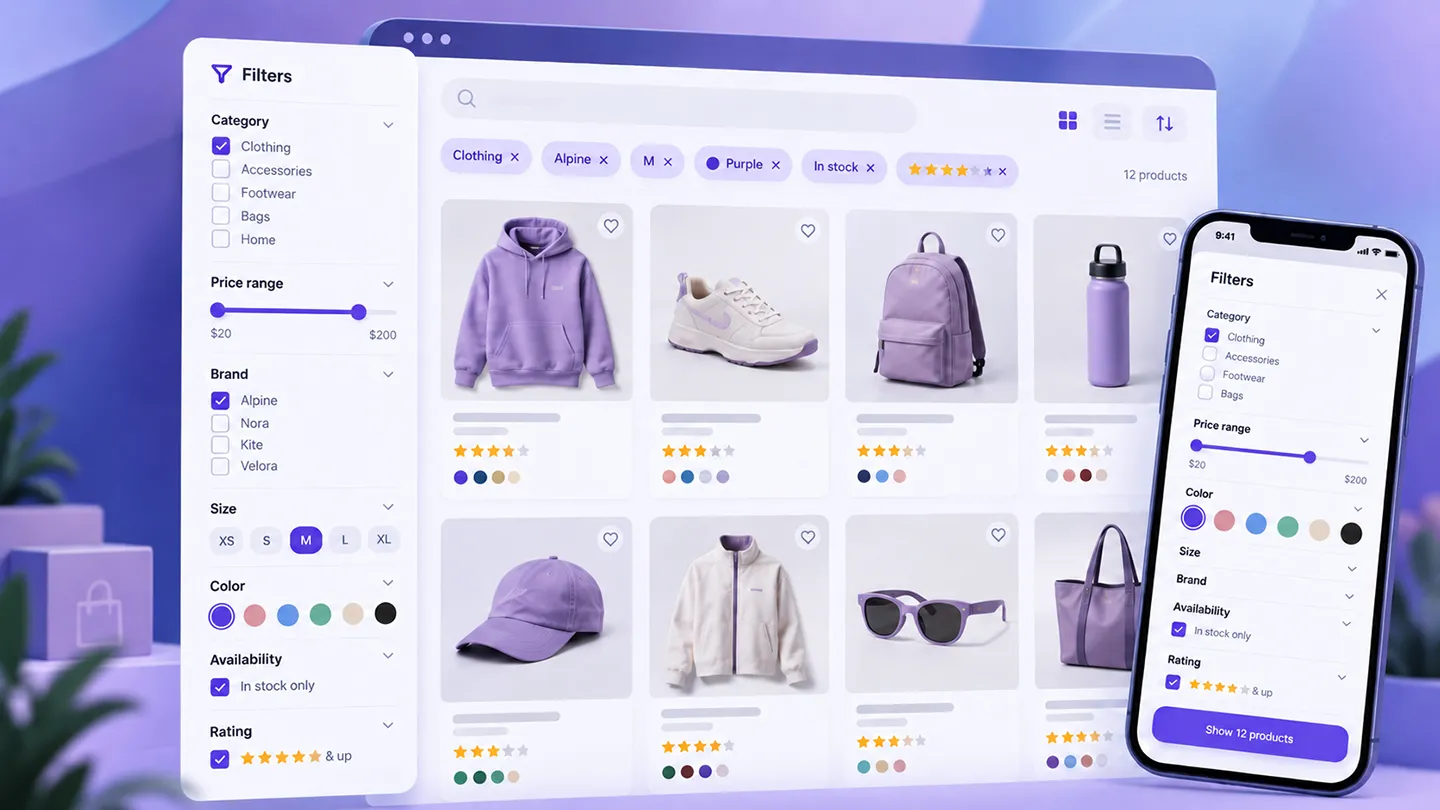
WooCommerce product filters look simple until you have to make them work on a real catalog.
A few checkboxes for size and color are easy.
The difficult part starts when the store has:
- hundreds or thousands of products,
- variable products,
- attributes that are reused inconsistently,
- products that should disappear when a variation is out of stock,
- category-specific filters,
- mobile shoppers,
- AJAX updates,
- page builders,
- SEO-sensitive filter URLs,
- custom taxonomies or fields,
- multilingual content,
- enough traffic that badly designed queries become expensive.
That is why product filtering is one of those WooCommerce jobs that can become much larger than expected.
A filter plugin is not only a front-end control.
It sits between the catalog data model, the product query, the URL structure, the theme, the customer's expectations, and sometimes Google's crawler.
Our main conclusion in 2026 is therefore:
Choose a filter plugin based on how complicated your catalog actually is — and test it with your real products before committing to the architecture.
For a developer-led store with complex faceting requirements, FacetWP is the option we would evaluate first.
For a merchant who wants a more WooCommerce-focused setup without turning filtering into a development project, Barn2 WooCommerce Product Filters is easier to justify.
If SEO control over filtered URLs and filterable content beyond products are major requirements, Filter Everything Pro becomes particularly interesting.
And before installing any of them, check whether WooCommerce's increasingly capable native Product Filters blocks already cover the store's needs.
Last researched: 9 October 2026.
A note on our experience: product filtering is an area where implementation quality depends heavily on the store's catalog structure, theme, variations, and custom code. We have worked with WooCommerce filtering and product-query customization, but we are not presenting all six products below as equally hands-on tested. Where our direct experience is limited, the recommendation is based on current documentation, product architecture, maintenance, compatibility, pricing, and fit for a specific use case.
The Short Version
| Plugin | Best for | Current pricing signal |
|---|---|---|
| FacetWP | Developer-led stores and complex faceted search | $99/year for 1–3 sites |
| Filter Everything Pro | SEO control and filtering beyond WooCommerce products | $69/year for 1 site + dev site |
| Barn2 WooCommerce Product Filters | Straightforward WooCommerce-focused filtering | $79/year for 1 site |
| YITH WooCommerce Ajax Product Filter | Visual filters, presets, and polished mobile UX | Free + Premium |
| BeRocket AJAX Products Filter | Feature breadth, styling, analytics, and multiple price tiers | From $44/year |
| HUSKY / WOOF | Advanced users who want many filtering modes and extensions | Free + paid; CodeCanyon listing currently $199 |
This is not a ranking from one to six.
The right product depends on whether your main problem is:
- catalog complexity,
- visual product discovery,
- variations,
- custom fields,
- filtered-page SEO,
- performance,
- mobile UX,
- builder integration,
- or simply getting a basic shop filter working without custom code.
Before Installing a Plugin: WooCommerce Filters Are Better Than They Used to Be
WooCommerce core now includes a Product Filters block system that is far more useful than the old mental model of a few basic sidebar widgets.
In 2026 WooCommerce has continued improving its native filtering experience.
WooCommerce 10.6 added custom taxonomy ordering support to Product Filters, and WooCommerce 10.9 introduced an experimental Color / Image product-attribute type for block themes so attributes such as colors and patterns can appear as visual swatches.
WooCommerce's 11.x development has also continued working on responsive filter presentation and Product Filters behavior.
That means a new block-based store should not automatically begin by installing another filtering plugin.
If all you need is:
- category,
- price,
- stock,
- rating,
- basic attributes,
- a normal Product Collection,
- and a sensible mobile layout,
test WooCommerce core first.
A third-party plugin becomes easier to justify when you need things such as:
- complex faceting,
- custom-field filters,
- sophisticated variation handling,
- advanced AND/OR logic,
- SEO landing pages from filter combinations,
- highly customized URLs,
- analytics around filter usage,
- unusual layouts,
- filtering non-product content,
- or integrations the core blocks do not cover.
The fewer systems involved in catalog queries, the easier the store is to maintain.
Why WooCommerce Product Filters Become Painful
A product-filter project usually fails for one of five reasons.
1. The catalog data is inconsistent
Filters can only be as good as the product data they query.
If one product uses:
Blue
another uses:
Navy Blue
another stores color in a custom field,
and a fourth has "blue" only inside the description, no filtering plugin can magically turn that into a clean color facet without a data strategy.
The same problem appears with:
- brands,
- materials,
- dimensions,
- technical specifications,
- compatibility,
- sizes,
- product types.
Before blaming the filter, inspect how the catalog is structured.
2. Variable products change what "matching" means
Suppose a shirt has these variations:
- Blue / Small — in stock
- Blue / Large — out of stock
- Red / Large — in stock
What should happen when the customer selects:
- Blue
- Large
- In stock
A weak filter implementation may show the parent product because it has blue somewhere and large somewhere, even though no in-stock variation matches all three conditions at once.
This is one of the most important things to test on stores with variations.
3. AJAX hides performance problems until the catalog grows
AJAX makes filters feel fast because the page does not fully reload.
That does not mean the underlying query is cheap.
A store can still generate expensive database work every time a customer:
- changes price,
- selects an attribute,
- clears a term,
- changes category,
- opens the next results page.
On a small catalog, almost anything feels fast.
On a large catalog with many attributes, the same architecture may become expensive.
4. Mobile filtering is a separate UX problem
A 300-pixel filter sidebar is fine on desktop.
On a phone it can push the actual products several screens down.
Modern filtering usually needs:
- a filter button,
- a drawer or modal,
- selected-filter chips,
- a clear reset action,
- sensible result counts,
- an Apply button when instant changes would be too noisy.
A plugin that looks impressive in a desktop demo can still be awkward on mobile.
5. Filter URLs can become an SEO problem
Filters create combinations.
If a store has ten colors, twelve sizes, eight brands, six materials, five price ranges, stock states, ratings, and categories, the theoretical URL space can explode.
That can create:
- duplicate or near-duplicate pages,
- crawl waste,
- thin filtered pages,
- inconsistent canonicals,
- indexable parameter combinations nobody should search for.
On the other hand, some filtered combinations can be useful landing pages.
For example:
black waterproof hiking boots
may be a legitimate search-intent page if the catalog and demand justify it.
The correct solution is control, not "index every filter" or "block every filter."
This is one reason Filter Everything and the higher-tier BeRocket SEO tooling are interesting: they explicitly treat filtered URLs as an SEO feature rather than an accidental side effect.
1. FacetWP — Best for Developer-Led Faceted Search
FacetWP is the product we would look at first when filtering is a substantial part of the site's architecture rather than a sidebar feature.
The current Basic license is $99/year for 1–3 websites, while higher plans cover more sites.
FacetWP is not WooCommerce-only.
It is a broader WordPress faceting framework that can filter:
- posts,
- products,
- custom post types,
- users,
- taxonomies,
- custom fields,
- WooCommerce product data.
For WooCommerce specifically, its current integration supports data sources including:
- price,
- sale price,
- regular price,
- average rating,
- stock status,
- on-sale state,
- featured state,
- product type,
- categories,
- tags,
- product attributes.
It also supports variable products.
Why we would choose it
FacetWP makes the most sense when a developer controls the product listing and needs filtering to work with a custom architecture.
That might include:
- a custom WooCommerce archive,
- ACF-based product specifications,
- custom taxonomies,
- a product table,
- a custom query,
- a page-builder listing,
- filtering that extends beyond WooCommerce's standard product model.
Its strength is flexibility.
The same flexibility also means we would not necessarily choose it for a merchant who wants to install a plugin, tick five filter options, and move on.
Facets are a useful way to think about filtering
FacetWP uses the language of facets rather than simply filters.
That is more than terminology.
A facet is one dimension through which a customer can narrow a collection:
- Brand
- Size
- Price
- CPU
- Material
- Compatibility
- Stock status
The useful part is that the available values should adapt to the current result set.
If the user selects "Apple," the remaining processor, screen-size, storage, and price facets should represent the Apple products still available — not the entire original catalog.
That is the experience customers increasingly expect from serious ecommerce filtering.
The trade-off
FacetWP is a strong tool, but it is most valuable when someone on the project understands:
- WordPress queries,
- templates,
- taxonomies,
- custom fields,
- how the product archive is generated.
For a straightforward store, a WooCommerce-specific filter plugin can require less implementation effort.
Best for: custom WooCommerce builds and stores where filtering is an important technical feature.
Our verdict: the strongest starting point for developer-led faceted search.
2. Filter Everything Pro — Best for SEO Control and Filtering Beyond Products
Filter Everything has one of the more interesting positions in this category because it is not restricted to WooCommerce.
It can filter WordPress content more generally, including products, posts, custom post types, taxonomies, and custom fields.
The current free version supports WooCommerce filtering, while Filter Everything Pro starts at $69/year for one production site plus one development site.
Why it stands out
The Pro version explicitly includes:
- AJAX filtering,
- unlimited filter sets,
- filtering by broad criteria,
- accurate variation filtering,
- out-of-stock filtering,
- clean filter URLs,
- SEO control for filtered pages,
- XML sitemap support for filtered pages,
- mobile filter UI,
- import/export,
- multiple filter display types.
That combination is unusual.
Many product-filter plugins treat URL structure as an implementation detail.
Filter Everything treats it as something the site owner may deliberately manage.
The SEO capability can be valuable — or dangerous
Creating crawlable filtered pages is not automatically good SEO.
The value depends on whether a filter combination maps to real search intent and whether the page provides enough distinct value to deserve indexing.
For example:
/shoes/color-black//laptops/brand-lenovo//chairs/material-oak/
might make sense.
But automatically generating hundreds of combinations involving:
- color,
- stock,
- rating,
- size,
- price,
- material,
- sale state,
can create a large amount of low-value crawlable inventory.
If you use the SEO features, define a strategy first.
Why we would choose it
Filter Everything is especially compelling when:
- filtered pages are part of the SEO plan,
- the site has products plus other filterable content,
- custom fields matter,
- the developer wants clean URL control,
- variation/out-of-stock accuracy is important.
Best for: stores where filtering, URL structure, and SEO need to be managed together.
Our verdict: one of the strongest all-round options when filtered-page SEO is a real requirement rather than an afterthought.
3. Barn2 WooCommerce Product Filters — Best Straightforward WooCommerce-Focused Option
Barn2 WooCommerce Product Filters is easier to understand.
It is a WooCommerce product-filter plugin designed specifically around the normal store-discovery problem.
The current one-site annual license is $79/year, with lifetime and multi-site options also available.
As of our review, Barn2 lists version 2.1.4, updated in August 2026.
What it covers
The plugin supports filters for data including:
- categories,
- price,
- size,
- color,
- product attributes,
- taxonomies,
- stock,
- sale status,
- ratings.
Display options include:
- checkboxes,
- radio buttons,
- dropdowns,
- labels,
- color swatches,
- range sliders,
- images.
Filtering can update through AJAX.
For mobile, Barn2 provides a slide-out filter approach and lets merchants configure different presentations for desktop and mobile.
Why we like the scope
There is value in a product whose job is simply:
make WooCommerce catalog filtering good.
Not every store needs a generic faceting framework or a filtered-page SEO engine.
If the catalog uses normal WooCommerce:
- categories,
- brands/taxonomies,
- global attributes,
- stock,
- price,
a purpose-built WooCommerce plugin can reduce implementation complexity.
Where we would look elsewhere
If a store depends heavily on:
- custom ACF data,
- unusual WordPress post types,
- custom query loops,
- SEO landing pages generated from facet combinations,
FacetWP or Filter Everything may be more natural.
Barn2 is strongest when the project is fundamentally a WooCommerce catalog filtering problem.
Best for: merchants and agencies that want a focused WooCommerce filter system without building a custom faceting architecture.
Our verdict: probably the easiest premium option here to recommend for a conventional WooCommerce catalog.
4. YITH WooCommerce Ajax Product Filter — Best for Visual Filters and Presets
YITH WooCommerce Ajax Product Filter is one of the more established WooCommerce-specific products in this category.
The current product page reports more than 44,000 customers, a 4.43/5 rating, and version 5.24.0, released on 30 September 2026.
There is a free version and a Premium edition.
The strength is presentation flexibility
YITH supports filters for:
- category,
- tag,
- product attributes,
- price,
- review rating,
- stock,
- sale state,
- brand through its related integration.
Filters can be presented as:
- checkboxes,
- radio buttons,
- dropdowns,
- multi-select controls,
- labels,
- images,
- color swatches,
- sliders.
It also supports:
- vertical layouts,
- horizontal filter bars,
- mobile modal filtering,
- AJAX results,
- optional Apply buttons,
- multiple presets for different parts of the catalog.
Category-specific presets matter more than they sound
Different catalog sections often need different filters.
A clothing category may need:
- size,
- color,
- gender,
- material.
A laptop category may need:
- processor,
- RAM,
- storage,
- screen size.
Showing every filter on every category creates noise.
YITH's preset model lets a store present different filtering systems in different contexts.
That is much more useful than a single global sidebar.
Variation handling is worth testing
YITH's current version highlights variation-aware filtering.
When a matching variation is found, the product listing can use information from that matching variation rather than treating the parent product as a generic match.
That is exactly the kind of behavior we would test carefully with a real variable catalog.
One limitation to notice
YITH's current FAQ states that the plugin does not work with ACF/custom fields.
That is a meaningful distinction.
If important product specifications live in ACF rather than global WooCommerce attributes or taxonomies, this would push us toward another solution.
Best for: visually rich WooCommerce filtering with different presets across product categories.
Our verdict: a polished WooCommerce-specific option, especially when attributes and visual filters are central to the catalog.
5. BeRocket AJAX Products Filter — Best Feature Breadth at Multiple Price Levels
BeRocket AJAX Products Filter has been around long enough to accumulate a very broad feature set.
Its current paid pricing runs from approximately $44 to $169/year, depending on license size, with a separate higher-feature Business tier also available.
The current product page lists version 3.3, updated in September 2026.
The filtering basics are extensive
BeRocket supports filters for:
- price,
- attributes,
- tags,
- custom taxonomies,
- availability,
- date,
- sale state,
- categories,
- rating,
- brands.
It also provides:
- checkboxes,
- dropdowns,
- sliders,
- color/image options,
- hierarchical values,
- AND/OR behavior,
- grouped values,
- filters above products,
- mobile configurations,
- reset/selected-filter controls.
The Business tier changes the product
BeRocket has increasingly moved beyond basic AJAX filtering.
Its Business features include tooling around:
- cleaner filtered permalinks,
- custom SEO metadata/H1 for filter pages,
- filter usage analytics,
- more advanced styling,
- grouped filter values.
Those features can be useful for large stores that want to understand which filters customers actually use.
For example, analytics could reveal that customers repeatedly filter by:
- width,
- fit,
- material,
while almost nobody uses a filter the team spent days designing.
That is useful product-discovery data.
Be careful with SEO automation
The same warning applies here as with Filter Everything.
The ability to generate SEO-friendly filter pages does not mean every filter combination should become indexable.
Use the feature deliberately.
Why we would choose it
BeRocket is attractive when the merchant wants a lot of WooCommerce-specific control without moving into a broader framework such as FacetWP.
It also has a free version, which makes testing the basic architecture easier.
Best for: WooCommerce stores that want a wide feature set, multiple filter layouts, and optional advanced SEO/analytics tooling.
Our verdict: one of the most feature-dense WooCommerce-specific options in the roundup.
6. HUSKY / WOOF — Best for Advanced Users Who Want Maximum Configuration
HUSKY – Products Filter Professional for WooCommerce, historically known as WOOF, is one of the older and more configurable products in this space.
It has a free version on WordPress.org and a Professional edition.
Its CodeCanyon listing currently shows more than 16,000 sales and continued 2026 maintenance.
Why it remains relevant
HUSKY supports filtering by:
- categories,
- attributes,
- tags,
- taxonomies,
- meta fields,
- price,
- SKU,
- text search.
It also includes more specialized capabilities such as:
- SEO-oriented filter links,
- step-by-step filtering,
- shortcode-driven placement,
- extensions,
- multiple display modes,
- developer APIs.
That makes it useful for advanced stores where the merchant or developer wants a large configuration surface.
The downside is the same thing
A lot of capability can become a lot of setup.
This is not the option we would automatically hand to a merchant who only needs:
- price,
- category,
- size,
- color.
Its strength appears when you need the unusual parts.
The current CodeCanyon price is high relative to several competitors, although the vendor also sells licenses directly and explicitly positions direct purchasing as the better-value route.
Why maintenance matters here
Filtering plugins interact with:
- WooCommerce queries,
- rewrite/canonical behavior,
- AJAX,
- taxonomy handling.
Those are areas where WooCommerce core changes can expose edge cases.
HUSKY's 2026 changelog includes fixes related to WooCommerce 11 behavior and canonical redirects, which is exactly the kind of maintenance signal we look for in a long-lived filtering plugin.
Best for: technical users who want a long-established product with many filtering modes and extensions.
Our verdict: powerful, but we would choose it because we need its depth — not because more settings automatically create a better storefront.
Native WooCommerce vs a Filter Plugin
For a new store, we would use this decision tree.
Use native WooCommerce Product Filters when:
- the store uses a modern block-based catalog,
- categories and global attributes are structured well,
- the filters are fairly standard,
- the store does not need custom-field faceting,
- filtered URLs are not part of an advanced SEO strategy,
- the merchant wants the smallest plugin stack possible.
Use Barn2 or YITH when:
- the store needs a more polished WooCommerce-specific filtering experience,
- mobile presentation matters,
- visual filters and category-specific layouts matter,
- the merchant wants less custom development.
Use FacetWP when:
- filtering is part of a custom application-like product discovery experience,
- the site uses custom post types, fields, or queries,
- a developer will own the implementation.
Use Filter Everything when:
- filter URLs and indexation are strategic,
- the site needs to filter more than products,
- custom content structures matter.
Use BeRocket or HUSKY when:
- the requirements list is long,
- the store needs unusual filtering modes,
- you want a large amount of control inside a WooCommerce-oriented plugin.
Product Filters vs Product Search
Search and filtering solve related but different problems.
A search box is useful when the customer can describe what they want.
A filter is useful when the customer knows the characteristics they want but not necessarily the exact product name.
For example:
"ThinkPad T14"
is a search problem.
But:
laptop → Lenovo → 16GB RAM → under $1,500 → in stock
is a filtering problem.
Many stores need both.
That is why we would treat product discovery as one system rather than installing search and filter plugins independently without checking how they interact.
Our Best WooCommerce Search Plugins in 2026 guide covers the search side separately.
If both systems:
- rewrite the product query,
- replace the results grid,
- add AJAX navigation,
- control the same URL state,
compatibility testing becomes important.
The Variation Problem: Test This Before Anything Else
If the catalog contains variable products, create a test matrix before choosing a plugin.
Take a product with combinations such as:
| Color | Size | Stock |
|---|---|---|
| Black | S | In stock |
| Black | M | Out of stock |
| Blue | M | In stock |
Then test combinations including:
- Black
- M
- Black + M
- Black + M + In Stock
- Blue + M + In Stock
The correct result depends on the store's desired behavior, but the plugin should be consistent and explainable.
A customer selecting Black + M + In Stock should not be shown a product merely because:
- the parent has Black somewhere,
- M somewhere,
- and another variation is in stock.
The matching purchasable variation matters.
This is one reason product filtering cannot be evaluated from screenshots alone.
AND vs OR Logic Can Completely Change Results
Suppose a customer selects:
- Red
- Blue
inside a Color filter.
Should that mean:
show products that are Red OR Blue
or:
show products that are Red AND Blue
For color, OR is often intuitive.
Now imagine the customer selects:
- Waterproof
- Insulated
Those may need AND behavior.
Good filter systems let the implementation define the appropriate relation.
Poorly chosen logic can make a store appear to have no products even when the catalog contains valid matches.
Test the semantics with real customer tasks rather than choosing AND/OR because one sounds more precise.
Mobile Filters Need Their Own Design
We would not launch a filtering system without testing it on a real phone.
On mobile, check:
- how the filter panel opens,
- whether the product count remains visible,
- whether selected filters are obvious,
- whether Clear/Reset is easy to find,
- whether applying a filter closes the panel unexpectedly,
- whether the page jumps after AJAX updates,
- whether long attribute lists are usable,
- whether sliders are easy to control with touch,
- whether users can return to the exact filtered state with the Back button.
A drawer/modal is often better than putting all filters above the product grid.
But even a drawer can become painful if it contains 40 open sections.
Use progressive disclosure:
- show useful categories first,
- collapse secondary filters,
- hide irrelevant terms,
- adapt available options to the current result set.
Product Counts: Helpful, but Not Free
Displaying:
- Black (18)
- Blue (27)
- Green (4)
can help customers understand the catalog.
It also means the system may need to calculate more information for each filtering state.
On complex catalogs, live counts can add query cost.
This is not an argument against counts.
It is a reminder to benchmark the feature rather than assuming every UI enhancement is free.
If filters become slow, test:
- with counts on and off,
- with AJAX enabled and disabled,
- with object caching,
- with realistic concurrent traffic,
- against production-sized catalog data.
A 50-product staging catalog is not a useful performance test for a 40,000-product live store.
Filters and SEO: Decide What Google Should See
This deserves explicit planning.
There are three broad approaches.
1. Do not index filtered combinations
This is often the safest default.
Customers can use filters normally, while search engines focus on:
- product pages,
- categories,
- brands,
- intentionally created landing pages.
2. Index selected useful combinations
This can make sense when filtered states map to meaningful search intent.
Examples:
- waterproof hiking boots,
- 4K gaming monitors,
- oak dining tables,
- red running shoes.
But these pages should behave like real landing pages:
- stable URL,
- meaningful title,
- appropriate H1,
- useful product set,
- canonical logic,
- no accidental duplicates.
3. Let every combination become indexable
We would almost never choose this deliberately.
Combinatorial navigation can create enormous crawl spaces.
Before enabling an "SEO URLs" feature, define:
- which parameters/combinations should be crawlable,
- which should be canonicalized,
- which should be noindexed,
- which should never appear in sitemaps.
The SEO feature is valuable because it provides control.
The strategy still has to come from you.
Performance: Test the Query, Not the Animation
A fast spinner does not mean a fast filter.
Use browser/network tools and server profiling to check:
- request duration,
- query count,
- slow SQL,
- PHP execution,
- response size,
- repeated requests,
- whether filter counts trigger extra work,
- how pagination behaves,
- cache hit rates.
If the plugin builds its own index, understand:
- when the index updates,
- what happens after bulk imports,
- how variation changes are reflected,
- whether scheduled/hidden products are handled correctly.
If it queries WooCommerce tables dynamically, test the production catalog size.
The same plugin can be excellent on one store and problematic on another because the catalogs are structurally different.
Builders and Custom Product Grids Are a Common Compatibility Trap
A plugin saying:
compatible with Elementor
does not necessarily mean:
compatible with every Elementor widget that can render products.
Filtering only works when the filter system knows which product query/results container it is controlling.
That becomes more complicated with:
- Elementor loops,
- custom WP_Query implementations,
- Bricks query loops,
- shortcode grids,
- theme-specific archives,
- product tables,
- custom REST-loaded grids.
Before buying, reproduce the exact listing architecture on staging.
Do not test a plugin's demo and assume your custom product loop will behave identically.
What We Would Test on Staging
For a real client store, this would be our minimum checklist.
Catalog logic
- Category filtering
- Attribute filtering
- Price ranges
- Stock state
- Sale state if used
- Brand taxonomy if used
- Custom fields/taxonomies if required
Multiple filters
- Multiple values from the same facet
- Multiple facets together
- AND/OR behavior
- Empty result handling
- Reset/Clear behavior
Variable products
- Variation-specific matches
- Out-of-stock variations
- Matching image/price behavior where supported
- Parent product visibility
Navigation
- Pagination
- Sorting
- Browser Back button
- Shareable URLs
- Refreshing the filtered URL
- Deep-linked filter states
Mobile
- Filter drawer/modal
- Selected filters
- Apply/reset controls
- Long lists
- Touch sliders
- Scroll position after AJAX updates
SEO
- Canonicals
- noindex behavior
- parameter URLs
- selected indexable combinations
- sitemap inclusion rules
- duplicate URLs for the same state
Performance
- First filter request
- Subsequent requests
- Query count
- large-category performance
- variation-heavy categories
- concurrent filtering under load if traffic is significant
Which Plugin Would We Choose?
For a custom, developer-led WooCommerce build, our first evaluation would be FacetWP.
It provides the kind of flexibility we want when product discovery is tied to:
- custom fields,
- custom templates,
- specialized product data,
- non-standard queries.
For a normal WooCommerce store that simply needs much better filtering, we would start with Barn2 WooCommerce Product Filters because its scope is clear and WooCommerce-specific.
For a store where filtered pages are deliberately part of the SEO architecture, we would compare Filter Everything Pro and BeRocket's higher-tier SEO features carefully.
For a store focused on visual attributes, category-specific presets, and polished customer-facing controls, YITH is easy to understand.
For a highly technical merchant who wants a large amount of configuration and does not mind complexity, HUSKY remains relevant.
But none of these is the right choice until the catalog itself is clean.
No filter plugin can compensate indefinitely for:
- inconsistent attributes,
- badly modeled variations,
- duplicate taxonomies,
- product specifications stored in arbitrary places,
- missing stock data.
Fix the product model first.
Then choose the filtering system.
Final Take
WooCommerce product filtering is not mainly a design problem.
It is a data + query + UX + SEO problem.
The visible checkbox is the easy part.
The difficult questions are:
- What exactly counts as a match?
- Does a real in-stock variation satisfy the selected filters?
- Which facets should still be available after each selection?
- Can the query stay fast as the catalog grows?
- Does mobile filtering remain usable?
- What happens to filtered URLs in Google?
- Does the filter still work with the theme's actual product loop?
Our six options solve different versions of that problem:
- FacetWP — best for developer-led faceted search.
- Filter Everything Pro — best when SEO and broader WordPress filtering matter.
- Barn2 WooCommerce Product Filters — best straightforward WooCommerce-focused option.
- YITH WooCommerce Ajax Product Filter — best for visual filters and category-specific presets.
- BeRocket AJAX Products Filter — best for broad WooCommerce feature coverage and optional advanced SEO/analytics.
- HUSKY / WOOF — best for advanced users who want a large configuration surface.
For simpler new stores, however, the most sensible answer may be none of them.
WooCommerce's native Product Filters are becoming increasingly capable.
Start there.
Add another filtering system only when you can point to the exact catalog problem it solves.
That approach is less exciting than installing the plugin with the longest feature list.
It is also much less likely to leave you debugging a filter sidebar three months later.