WooCommerce has two checkout architectures in active use in 2026, and they are similar enough on the surface to cause confusion.
A customer still enters contact details, chooses shipping, selects a payment method, reviews the order, and places it.
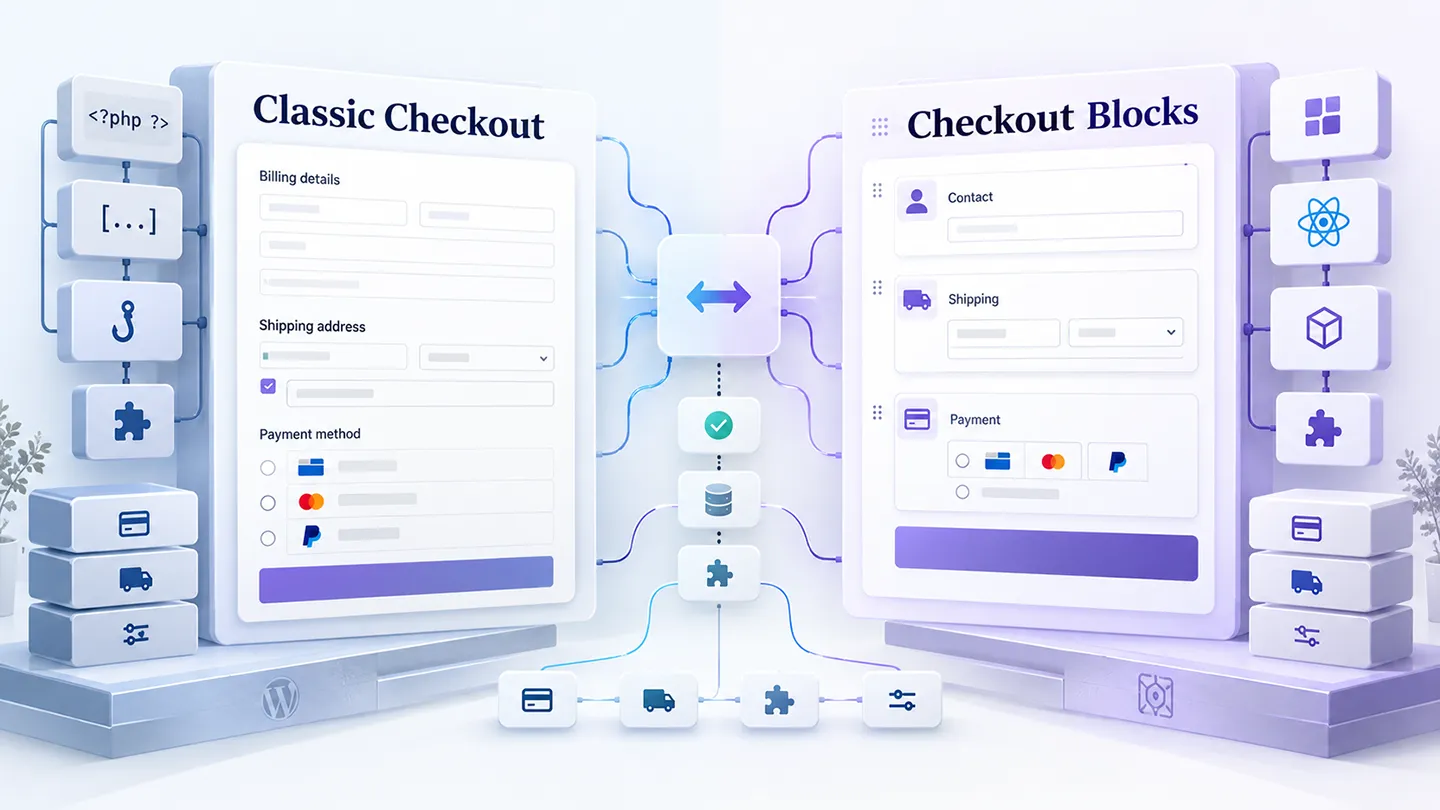
Underneath, however, Checkout Blocks and Classic Checkout are different extension environments.
That difference matters whenever a store uses custom checkout fields, payment gateways, shipping logic, subscriptions, address tools, order bumps, checkout replacements, or PHP snippets written around WooCommerce hooks.
For new WooCommerce stores, Checkout Blocks are now the default. WooCommerce says stores created after WooCommerce 8.3 use the Cart and Checkout blocks by default, and its current documentation recommends the block experience for most new setups.
That does not mean every existing store should migrate immediately.
WooCommerce's own shortcode documentation still notes that the classic versions can have better compatibility with some extensions.
Our practical recommendation is therefore straightforward:
Use Checkout Blocks when your extension stack supports them cleanly. Keep Classic Checkout when an important part of the store still depends on classic hooks, templates, or an extension that has not fully migrated.
The right answer is determined by the store's actual dependency stack, not by which checkout is newer.
Last researched: 25 September 2026.
The Short Version
| Situation | Better starting point |
|---|---|
| New WooCommerce store with modern, compatible extensions | Checkout Blocks |
| Existing store with extensive classic PHP customization | Classic Checkout until audited |
| Store relying on checkout-field plugins | Either — verify the exact feature on Blocks |
| Store using custom payment or shipping integrations | Either — explicit compatibility matters |
| Store with many old snippets built around checkout hooks | Classic Checkout initially |
| Store rebuilding checkout from scratch | Checkout Blocks, if the required extensions support it |
| Store using a checkout replacement or funnel system | Follow that product's supported architecture |
| Store unsure whether an extension supports Blocks | Do not migrate production until tested |
If we were launching a normal WooCommerce store today, we would start with Checkout Blocks.
If we inherited a mature store with years of custom checkout code, we would not switch simply because Blocks are the modern default. We would first map every extension and customization that touches checkout.
What Is Classic WooCommerce Checkout?
Classic Checkout is the long-established WooCommerce checkout rendered through the [woocommerce_checkout] shortcode.
It grew around the traditional WordPress and WooCommerce extension model:
- PHP templates,
- PHP actions and filters,
- checkout-field arrays,
- server-side validation,
- theme overrides,
- snippets in plugins or a child theme,
- JavaScript layered onto the rendered checkout.
For many years, this was simply "WooCommerce checkout."
That long history is one of its biggest strengths.
There is a huge amount of existing documentation, extension code, agency knowledge, Stack Overflow history, snippets, and commercial-plugin behavior built around classic checkout.
It is also why mature WooCommerce stores can have surprisingly deep dependencies on it.
A store may appear to use the normal checkout while actually relying on code that:
- moves billing fields,
- removes fields conditionally,
- validates tax identifiers,
- inserts delivery dates,
- hides payment methods,
- changes shipping options,
- writes custom order metadata,
- injects notices,
- adds subscription-specific logic,
- changes labels,
- adds tracking or CRM data,
- modifies the order review.
That code may have been accumulated over five or ten years.
Classic Checkout remains valuable because that ecosystem is mature.
Its weakness is the other side of the same coin: the architecture was not designed around the more structured, component-based checkout model WooCommerce is now building toward.
What Are WooCommerce Checkout Blocks?
Checkout Blocks are WooCommerce's newer block-based checkout architecture.
For stores created after WooCommerce 8.3, released in November 2023, WooCommerce made the Cart and Checkout blocks the default experience.
The current WooCommerce checkout documentation describes the Checkout Block as the default for new WooCommerce installs.
The customer-facing goal is still checkout.
The implementation is different.
WooCommerce's Cart and Checkout extensibility documentation explains that the block checkout uses a JavaScript-driven front end, defined extensibility interfaces, and WooCommerce's Store API.
Extensions can still use PHP on the server, but not every classic checkout hook maps directly to the block experience.
That is the architectural shift developers need to understand.
Classic Checkout is largely:
rendered checkout + PHP extension points + templates.
Checkout Blocks are more like:
application-style checkout + Store API + block components + documented extension interfaces.
For merchants, the visible distinction can seem small.
For extensions, it can be substantial.
The Most Important Difference: Extensibility
This is where most real migration problems originate.
WooCommerce historically encouraged developers to modify checkout with PHP hooks and filters.
That is still possible in parts of the block checkout, but WooCommerce explicitly states that some classic actions and filters work while others require block-specific alternatives.
The block system provides its own extension mechanisms for tasks such as:
- adding UI,
- filtering displayed values,
- integrating payment methods,
- adding checkout fields,
- extending Store API data,
- validating checkout input,
- responding to checkout events.
WooCommerce also provides a compatibility declaration that extensions can use to state whether they support Cart and Checkout Blocks.
That is useful, but it does not eliminate testing.
A plugin can broadly support Blocks while one specific feature you depend on behaves differently.
For example, a checkout-field plugin might support adding fields in both architectures while offering different field types, placement rules, or conditional logic in the block version.
So the useful question is not:
"Does this plugin support WooCommerce?"
It is:
"Does the feature we use support Checkout Blocks?"
That distinction is especially important in 2026.
Checkout Fields Are a Good Example of the Difference
Custom fields make the architecture change easy to understand.
In Classic Checkout, developers have historically manipulated checkout fields using familiar WooCommerce PHP hooks and filters.
That model made tasks such as these relatively straightforward:
- remove company name,
- change field priority,
- rename labels,
- add VAT ID,
- add delivery instructions,
- make a field conditionally required,
- store additional order metadata.
Checkout Blocks have a dedicated checkout-fields system and block-oriented extension APIs.
That is not inherently worse.
In fact, a defined field API can make integrations more predictable over time.
But old snippets written for Classic Checkout should not be assumed to work in Blocks.
Commercial field plugins illustrate this well. Some vendors support both architectures but document separate capabilities for each.
If checkout fields are important to the store, audit them individually before migration.
Payment Gateways Need Explicit Testing
Payment is the part of checkout where we are least interested in theoretical compatibility.
A gateway either completes real orders correctly or it does not.
Checkout Blocks have a defined payment-method integration system, and many major payment extensions support it.
But stores often run more than a major gateway.
You may also have:
- local payment methods,
- buy-now-pay-later services,
- saved-payment-token logic,
- subscription renewals,
- express checkout buttons,
- fraud tools,
- payment surcharges,
- conditional payment rules,
- custom gateway code.
When migrating, test every payment path the store actually accepts.
That includes:
- normal purchase,
- logged-in customer,
- guest checkout,
- saved payment method,
- coupon,
- tax,
- shipping,
- subscription product if applicable,
- failed payment,
- mobile checkout.
A successful test transaction with one card is not a checkout compatibility audit.
Shipping Rules Can Be Just as Sensitive
Shipping extensions frequently interact with cart state, addresses, package data, rates, pickup methods, and checkout refresh behavior.
A basic flat-rate setup is unlikely to be the difficult case.
Complex stores may depend on:
- postcode restrictions,
- carrier APIs,
- table rates,
- conditional methods,
- local pickup,
- shipping based on product classes,
- delivery dates,
- multi-package shipping,
- address validation,
- dynamic surcharges.
The Checkout Block has a different front-end state model from Classic Checkout.
That means custom JavaScript written to watch classic checkout updates is particularly worth reviewing.
If a store has complicated shipping, we would treat it like payments: test real scenarios, not only whether a method appears.
Classic Hooks Are the Main Reason Not to Rush a Migration
A mature WooCommerce site can contain checkout logic in places the merchant does not know about.
We have seen stores where important behavior lived in:
- a custom plugin,
- the child theme,
- Code Snippets,
- an old agency utility plugin,
- checkout-plugin settings,
- payment-gateway filters,
- shipping code,
- subscription customizations.
If those customizations were written around classic hooks, moving to Blocks can change or remove the point where that code expects to run.
WooCommerce maintains documentation for migrated hooks and alternatives, but not every legacy customization has a direct one-line replacement.
That is why "Blocks are the default now" is not a migration strategy.
For an established store, inventory the code first.
Why We Prefer Checkout Blocks for New Stores
Despite the compatibility caveats, we would normally choose Checkout Blocks for a new WooCommerce build in 2026.
There are several reasons.
1. It is WooCommerce's default direction
New stores have received Cart and Checkout Blocks by default since WooCommerce 8.3.
That tells extension developers where compatibility work increasingly needs to happen.
2. The checkout is built around a more defined extension model
A structured API is less convenient than "hook almost anywhere" when you need a quick hack, but it can make extension behavior more predictable.
WooCommerce's block architecture gives developers documented interfaces for checkout UI, filters, payment methods, Store API extensions, and validation.
3. Store editing is more integrated
For compatible themes and setups, merchants can work with checkout as part of the broader block/site-editing system.
The current Checkout Block documentation exposes structured areas such as Checkout Fields and Checkout Totals.
4. Starting modern is easier than migrating modern
A new store has little legacy checkout code.
That is the ideal time to choose the current architecture.
The migration problem becomes harder after years of extensions and snippets accumulate.
Why Classic Checkout Still Makes Sense
Classic Checkout is not automatically a bad choice in 2026.
There are legitimate reasons to keep it.
An important extension still requires it
This is the strongest reason.
If a revenue-critical plugin does not support Blocks properly, the newer checkout architecture has no practical advantage.
Your checkout has substantial custom PHP logic
Rebuilding working business logic purely for architectural cleanliness can create cost and regression risk without producing meaningful customer value.
A checkout replacement manages the experience
Products such as CheckoutWC and funnel systems may have their own compatibility requirements and rendering architecture.
If you use one, follow the product's current documentation rather than making a generic core-checkout decision.
Our Best WooCommerce Checkout Plugins in 2026 guide looks at these products as separate checkout strategies.
The migration has no business case yet
"Newer" can be a reason to plan a migration.
It is not always a reason to deploy one today.
If Classic Checkout is stable, secure, compatible, and meeting the store's requirements, a migration should still have an objective:
- easier maintenance,
- access to newer extension features,
- better editing workflow,
- removal of legacy code,
- modernization during a redesign.
Avoid introducing checkout risk only to remove an architectural label.
Does Checkout Blocks Automatically Convert Better?
We would not make that claim.
WooCommerce describes its modern cart and checkout blocks as conversion-optimized, and the project has clearly invested in the customer experience.
But store conversion is affected by much more than the underlying checkout architecture:
- payment methods,
- shipping price,
- trust,
- field count,
- mobile usability,
- site speed,
- address friction,
- errors,
- product price,
- cart quality,
- audience quality.
Switching from Classic Checkout to Blocks does not guarantee a conversion increase.
Likewise, a heavily customized classic checkout can outperform a poorly configured block checkout.
Measure the actual store.
If conversion improvement is the goal, define metrics before migration and compare:
- checkout-start rate,
- payment errors,
- checkout completion,
- mobile completion,
- time to complete,
- abandonment by step or error where available.
Architecture should enable a better checkout, not become the metric itself.
What About Checkout Performance?
The same caution applies to performance.
Checkout Blocks use a more application-like front end and Store API calls, while Classic Checkout follows the traditional WooCommerce rendering model.
That architectural difference does not produce a universal winner on every store.
Performance depends on:
- hosting,
- database load,
- theme,
- extensions,
- payment scripts,
- analytics scripts,
- shipping APIs,
- third-party tags,
- custom code.
Benchmark the actual checkout.
Do not choose an architecture because someone reported a faster test on a completely different stack.
How to Tell Which Checkout Your Store Uses
The easiest method is to edit the Checkout page.
If you see a Checkout block, you are using Checkout Blocks.
If you see the classic [woocommerce_checkout] shortcode or its Classic Shortcode representation, you are using Classic Checkout.
WooCommerce documents this distinction directly.
For block themes, checkout can also be managed through the Site Editor and WooCommerce checkout template.
If you inherit a store and the answer is still unclear, inspect the page configuration before changing anything.
How to Check Whether a Plugin Supports Checkout Blocks
Use several signals rather than one.
Check the vendor documentation
Search specifically for:
- Checkout Blocks,
- Cart and Checkout Blocks,
- block checkout,
- Store API,
- compatibility with WooCommerce blocks.
A generic "compatible with WooCommerce 10.x" statement is not enough.
Check the feature you actually use
A plugin may support Blocks generally while a particular option remains classic-only.
This is common with extensions that have deep checkout customization.
Look for compatibility declarations
WooCommerce provides a cart_checkout_blocks compatibility declaration for extensions.
Developers can declare a plugin compatible or incompatible.
That is useful technical evidence, although real integration testing still matters.
Check recent changelogs
A plugin that added Blocks support years ago may have continued to fix edge cases involving:
- express payment,
- validation,
- checkout fields,
- subscriptions,
- order metadata,
- payment gateways.
Recent maintenance matters.
This is also part of the broader process we describe in How to Evaluate WooCommerce Plugin Quality Before You Install It.
A Practical Migration Checklist
If an existing store is moving from Classic Checkout to Checkout Blocks, we would use a staging environment and test in layers.
Step 1: Inventory everything that touches checkout
Include:
- payment gateways,
- shipping plugins,
- tax plugins,
- subscription extensions,
- custom checkout fields,
- address autocomplete,
- fraud tools,
- order bumps,
- checkout replacements,
- analytics,
- consent tools,
- custom code,
- snippets,
- child-theme overrides.
Step 2: Classify each dependency
For each item, record:
- confirmed Blocks support,
- partial Blocks support,
- unknown,
- Classic-only,
- no longer needed.
"Unknown" should be treated as something to test, not as compatible.
Step 3: Build the block checkout on staging
WooCommerce's current documentation explains how to customize the Checkout page and also how to revert to Classic Checkout.
That reversibility is useful.
Do not make production the testing environment.
Step 4: Test complete purchase scenarios
At minimum test:
- guest customer,
- logged-in customer,
- mobile,
- each major payment method,
- each shipping class/method,
- coupon,
- tax,
- account creation,
- order emails,
- order metadata,
- refunds where relevant.
For subscription stores, also test sign-up behavior and the payment method's subscription compatibility. Our WooCommerce subscription plugin guide covers the broader recurring-payment ecosystem.
Step 5: Compare the stored order data
Do not stop at "the order completed."
Check that business-critical data appears where downstream systems expect it.
Examples:
- VAT number,
- delivery instructions,
- CRM fields,
- ERP identifiers,
- custom metadata,
- selected delivery date,
- marketing consent.
Step 6: Monitor after release
Checkout changes deserve tighter monitoring than ordinary content changes.
Watch:
- failed orders,
- payment errors,
- support tickets,
- conversion,
- mobile behavior,
- browser-specific issues,
- third-party integrations.
Can You Go Back to Classic Checkout?
Yes.
WooCommerce's current checkout customization documentation includes instructions for transforming the Checkout block back to a Classic Shortcode.
That is important because migration does not have to be treated as an irreversible platform decision.
If a required extension fails on Blocks, you can restore Classic Checkout while the incompatibility is investigated.
We still recommend testing the rollback process on staging before a major checkout migration.
What Developers Need to Know
For developers, the architectural difference is more important than the visual difference.
A classic customization might begin with:
- PHP hooks,
- checkout field filters,
- template overrides,
- jQuery listening for checkout updates.
A block integration may instead require:
- JavaScript extension code,
- WooCommerce block components,
- checkout filters,
- Store API extensions,
- registered checkout fields,
- payment-method integration APIs,
- block checkout events and validation.
WooCommerce's developer documentation describes the Checkout Block as having a single source of truth for checkout data and defined interfaces through which extensions communicate with checkout.
That is a healthier long-term model for many integrations, but it means old code should be reviewed rather than copied blindly.
When building something new, we would avoid creating a Classic-only checkout customization unless there is a clear reason.
When maintaining something old, we would avoid rewriting working code merely to say it uses Blocks.
Checkout Blocks vs Classic Checkout: Our 2026 Decision Framework
Use Checkout Blocks when:
- the store is new,
- all important extensions explicitly support Blocks,
- you are building custom checkout functionality now,
- the store wants the current WooCommerce editing model,
- migration testing shows no regression.
Stay on Classic Checkout for now when:
- an important extension remains incompatible,
- the checkout contains significant legacy customization,
- a business-critical snippet depends on classic behavior,
- the migration would require a rushed production rewrite,
- the store's checkout replacement specifically expects Classic Checkout.
Plan a staged migration when:
- the only blockers are a small number of replaceable extensions,
- the store is already being redesigned,
- custom checkout code is being refactored,
- long-term maintenance is more important than preserving old implementation details.
The key word is staged.
The Mistake to Avoid
The biggest mistake is choosing based on ideology.
"Blocks are modern, therefore migrate."
and
"Classic has always worked, therefore never migrate."
are both weak engineering decisions.
WooCommerce's own documentation reflects a more nuanced reality:
- Blocks are the default for new installations.
- WooCommerce recommends the modern cart and checkout experience.
- Classic checkout remains available.
- Some shortcode-based setups can still have better extension compatibility.
- Block extensibility is different, and extensions need to integrate with it deliberately.
That is the useful 2026 answer.
Our Recommendation
For a new WooCommerce store, use Checkout Blocks unless a required extension gives you a concrete reason not to.
For an existing store, do not switch checkout architecture without an extension and customization audit.
If everything important supports Blocks, migrating is reasonable and increasingly aligns the store with WooCommerce's current development direction.
If one revenue-critical integration still depends on Classic Checkout, keep Classic Checkout until that dependency is resolved.
Checkout is too important to turn architectural modernization into a production experiment.
And if the real problem is not architecture but the checkout experience itself, start with the requirement. Our Best WooCommerce Checkout Plugins in 2026 guide separates checkout replacements, funnel builders, field editors, one-page checkout, and direct-to-checkout tools so you do not install a larger system than the store actually needs.
For a broader view of the WooCommerce extension stack, see Best WooCommerce Plugins in 2026.