
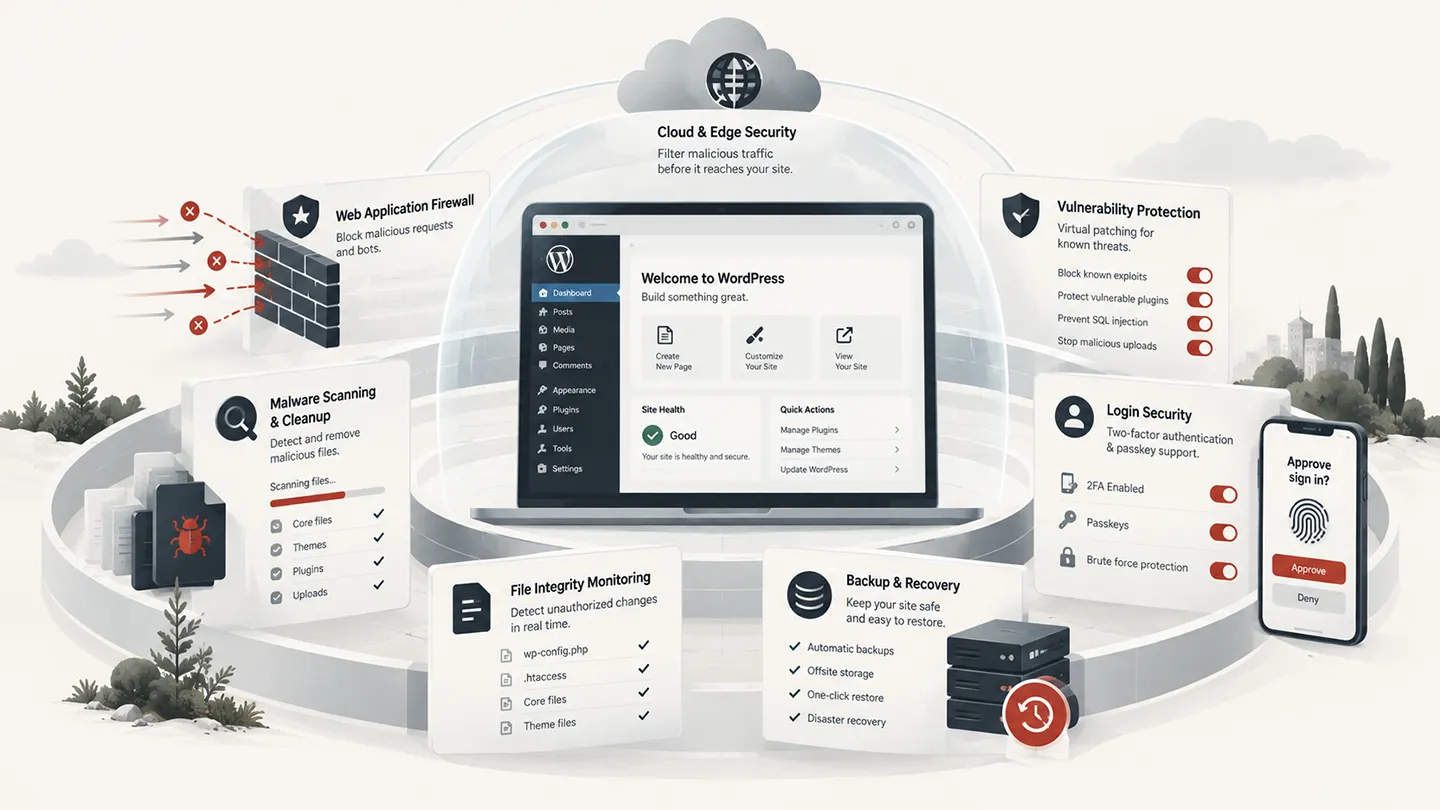
WordPress security plugins are easy to compare badly.
One product emphasizes a firewall. Another focuses on malware cleanup. Another is strongest at vulnerability intelligence and virtual patching. Some are primarily login-hardening tools. Others move most of the heavy scanning work off your server.
Calling all of them simply "security plugins" hides the most important question:
What layer of security do you actually need the plugin to provide?
For most general WordPress sites, our default remains Wordfence. We have used it in real WordPress work, it has an unusually large production footprint, and it combines a mature application firewall, malware scanning, login security, vulnerability intelligence, and a free tier that is still useful.
But Wordfence is not automatically the best fit for every site.
If malware cleanup is the main concern, MalCare deserves a serious look. If you manage many client sites and care heavily about vulnerable plugins and virtual patching, Patchstack approaches the problem differently. Sucuri remains relevant if you want a security service with a cloud firewall and cleanup. All-In-One Security gives smaller sites a lot of hardening for free. Kadence Security — formerly Solid Security and iThemes Security — remains capable, although we would currently approach its 2026 transition with more caution than before.
Last researched: 18 September 2026.
This guide is about WordPress security plugins and services. It is not a substitute for secure hosting, current software, reliable backups, least-privilege access, and sensible operational practices.
The Short Version
| Plugin | Best for | WordPress.org active installs | Model |
|---|---|---|---|
| Wordfence Security | Best overall for most WordPress sites | 5+ million | Free + Premium/Care/Response |
| MalCare | Malware detection, cleanup, and recovery | 200,000+ | Free + paid protection/cleanup plans |
| Patchstack | Vulnerability protection for developers and agencies | 60,000+ | Free plugin + paid multi-site protection |
| Sucuri Security | Cloud firewall and cleanup service | 600,000+ | Free plugin + paid security platform |
| All-In-One Security (AIOS) | Broad free hardening and login protection | 1+ million | Free + Premium |
| Kadence Security | User/login hardening and established WordPress security tooling | 700,000+ | Free + commercial offering |
If we had to install one security plugin on a normal WordPress site today, Wordfence would still be our default starting point.
That recommendation changes when the problem is more specific. A site that is already hacked needs a different toolset from a clean brochure site. An agency maintaining 100 sites has different requirements from a merchant running one WooCommerce store.
What a Security Plugin Can — and Cannot — Protect
A WordPress security plugin operates inside a larger security stack.
It can help with things such as:
- blocking malicious requests,
- scanning files and databases for malware,
- detecting vulnerable plugins and themes,
- enforcing two-factor authentication,
- slowing or blocking brute-force login attempts,
- monitoring file changes,
- applying WordPress-specific hardening,
- logging suspicious activity,
- notifying administrators about security events,
- in some products, cleaning infected sites.
But it cannot compensate for everything.
If the hosting account itself is compromised, if an attacker has stolen cPanel or SSH credentials, if a developer installs a nulled plugin containing a backdoor, or if backups are unusable, the WordPress plugin is only one layer in the incident.
That is why we prefer a defense-in-depth approach:
- maintained WordPress core, plugins, and themes,
- secure hosting and current PHP,
- strong administrator authentication and 2FA,
- reliable off-site backups,
- a firewall or edge-security layer where appropriate,
- WordPress-specific monitoring and scanning,
- a clear recovery path if prevention fails.
For more on how we judge plugins generally, see our guide to evaluating WooCommerce plugin quality before installation. The same principles around maintenance, support, data handling, and realistic staging tests apply to security software too.
1. Wordfence Security — Best Overall for Most WordPress Sites
Wordfence Security is still the security plugin we are most comfortable recommending as the default for a typical WordPress installation.
That is partly because of features, but just as importantly because of production history.
The WordPress.org plugin currently has 5+ million active installations, a 4.7/5 rating, and version 9.0.1 was released in September 2026. The 9.0 release added passkey authentication, including WooCommerce integration, alongside the existing firewall, malware scanner, 2FA, brute-force protection, blocking tools, and live-traffic features.
Our experience with Wordfence
Wordfence is one of the WordPress security tools we have used in real site work rather than only researched for this comparison.
What we like most is that it gives us a useful set of layers in one place without requiring the site owner to understand every security concept before getting basic protection.
The firewall is WordPress-aware. The scanner knows what normal WordPress core, plugin, and theme files should look like. Login security is integrated. Alerts are detailed. And because Wordfence is so widely deployed, there is a large amount of documentation and real-world troubleshooting information when something unusual happens.
For a developer, it is also useful that the product exposes enough detail to understand what it is blocking rather than presenting security as a single green or red score.
The major free-vs-paid difference
The free version is good, but it is important to understand the delay in threat intelligence.
Wordfence states that Premium, Care, and Response customers receive new firewall rules immediately, while free users normally receive those rules 30 days later.
That distinction matters most during the window between disclosure of a plugin vulnerability and either updating the vulnerable software or receiving a protective firewall rule.
For a low-risk brochure site that is updated promptly, the free version can still be a very reasonable layer.
For a high-value WooCommerce store, membership site, publisher, or site that cannot patch immediately, the faster protection in a paid tier is much easier to justify.
What we like
Wordfence combines:
- a WordPress-specific web application firewall,
- malware scanning,
- file-integrity checking,
- vulnerability alerts,
- brute-force protection,
- 2FA,
- passkeys,
- login security,
- country blocking in paid configurations,
- live traffic and blocking tools,
- a large threat-intelligence operation,
- optional higher-end incident-response services.
The fact that the product is actively maintained is also important. Security software cannot be treated as "finished."
What we do not like
Wordfence is not lightweight in the sense of being invisible.
Deep scans, live traffic, logging, and an application-level firewall all consume resources. On a well-sized server that is normally manageable, but we would not install it with every logging feature enabled on a resource-starved shared-hosting account and then ignore performance.
The interface also exposes a lot of settings. That is useful for experienced administrators but can make Wordfence feel more complicated than products that hide most decisions behind a hosted service.
And the 30-day delay for new firewall rules on the free tier is a meaningful limitation, not a cosmetic premium feature.
Who should choose it
We would use Wordfence when:
- we want one mature plugin covering several security layers,
- WordPress-specific firewalling matters,
- malware scanning and file integrity matter,
- we want strong login security,
- the site owner or developer is comfortable reviewing alerts,
- we want a free tier that remains genuinely useful,
- a paid upgrade is available if the site becomes more business-critical.
Best for: most general WordPress sites, especially when you want one proven security plugin rather than assembling several smaller tools.
2. MalCare — Best for Malware Cleanup and Recovery
MalCare approaches WordPress security more like a hosted security service than a traditional plugin that does all of its heavy work locally.
The WordPress.org plugin currently has 200,000+ active installations. MalCare says its scanning engine performs the intensive analysis on its own infrastructure rather than consuming the site's server resources for the full malware analysis.
That distinction is attractive when you are responsible for sites on modest hosting or when malware scanning itself is becoming expensive.
Where MalCare stands out
MalCare's strongest story is not simply prevention.
It is the path from:
detect → investigate → clean → recover
The current free tier includes basic firewalling, vulnerability alerts, login protection, 2FA for a small number of users, SSL monitoring, and scheduled malware scanning.
Its paid plans move progressively toward more frequent scanning, more advanced firewalling, virtual patching, and actual malware cleanup.
At the time of this review, MalCare lists:
- Protect — $99/year for one site, focused on prevention,
- Repair — $299/year, adding malware cleanup and a faster expert-response SLA,
- Fortify — $499/year, aimed at higher-value and mission-critical sites with hourly scanning and faster response.
The important detail is that the $99 Protect plan does not include malware cleanup. Cleanup starts at the Repair tier.
That is worth understanding before a site is compromised rather than after.
Why we like the architecture
Scanning outside the WordPress server is a meaningful design choice.
Malware scans can be CPU and disk intensive. Moving analysis away from the production server reduces the risk that a deep scan competes with normal front-end traffic.
For agencies and stores where uptime matters, that can be more useful than having every security function execute locally.
What gives us pause
MalCare becomes substantially more expensive once cleanup and fast human response are required.
That is not necessarily bad value — emergency cleanup is real work — but users comparing the free plugin with Wordfence Free can easily miss that they are comparing very different service models.
We have not relied on MalCare as our primary security stack in the same way we have used Wordfence, so our view here is based on current product research rather than equivalent hands-on operating history.
Best for: sites where malware detection, cleanup, and a clear recovery service matter more than having every security control inside wp-admin.
3. Patchstack — Best for Vulnerability Protection and Agencies
Patchstack is much more focused on the vulnerability problem inside the WordPress ecosystem.
Its WordPress.org plugin currently has 60,000+ active installations and a 4.9/5 rating.
Patchstack's central idea is simple: WordPress sites are often compromised through vulnerable plugins and themes, and there can be a dangerous period between a vulnerability becoming known and every site successfully installing a fixed version.
Virtual patching tries to close that gap.
Where Patchstack is different
Patchstack is not trying to look like the biggest all-in-one security dashboard.
Its strongest capability is vulnerability intelligence combined with vPatching / RapidMitigate, where protective rules can block exploitation of known vulnerabilities without modifying the vulnerable plugin's code.
That is especially interesting for agencies.
When you maintain dozens of client sites, "update everything immediately" is not always a realistic operational policy. Some updates need staging, some sites are fragile, and some vulnerable plugins do not yet have a patch.
A virtual patch can provide time to respond properly.
Pricing is agency-oriented
Patchstack's current paid Developer plan is structured around multiple sites rather than a cheap one-site consumer upgrade.
At the time of review, the annual plan is $69/month for up to 25 sites, with additional site packs available.
That makes much more sense for a developer, agency, maintenance company, or hosting provider than for a hobby site owner protecting one blog.
What we like
Patchstack is particularly compelling if your main concern is the modern WordPress vulnerability lifecycle:
- plugin vulnerability is discovered,
- disclosure begins,
- exploitation may start,
- vendor releases a fix,
- site owner still needs to update,
- meanwhile the vulnerable endpoint remains exposed.
That gap is exactly what virtual patching is designed to reduce.
What it does not replace
Patchstack should not be confused with a full hacked-site recovery service.
Vulnerability protection is one layer. Backups, account security, malware response, hosting security, and incident recovery still matter.
For a single normal site, Wordfence may be the easier default.
For an agency managing a fleet of client sites, Patchstack becomes much more interesting.
Best for: developers, agencies, maintenance businesses, and site fleets where vulnerable plugins and safe update timing are major operational concerns.
4. Sucuri Security — Best if You Want a Cloud Firewall and Security Service
Sucuri Security remains one of the most recognizable names in WordPress security.
The free WordPress plugin currently has 600,000+ active installations and was updated in September 2026.
It includes auditing, file-integrity monitoring, remote malware scanning, hardening, post-hack tools, and security notifications.
But the most important distinction is this:
The free plugin and Sucuri's paid cloud security platform are not the same thing.
The cloud firewall is the real differentiator
Sucuri's paid platform can put a cloud web application firewall and CDN in front of the site.
That means malicious requests can be filtered before they reach WordPress or even the origin web server.
Architecturally, that is different from a plugin-level firewall executing as part of the WordPress/PHP environment.
Neither approach automatically wins in every situation, but upstream filtering is attractive for sites that are dealing with heavy malicious traffic or want security and CDN services combined.
Current paid pricing
Sucuri currently lists its Basic Platform at $229/year, with higher tiers at $339/year and $549/year, plus agency and multi-site offerings.
Those paid plans are where the service becomes much more than the free WordPress plugin, particularly around firewalling, monitoring, cleanup, and response.
What we like
Sucuri makes sense when the merchant thinks in terms of a managed security service rather than "install a plugin and configure some rules."
It is also platform-agnostic at the cloud layer, which can be useful when WordPress is only part of a broader web stack.
What we would check first
We would compare Sucuri directly with the security stack already provided by the host and CDN.
If a site already sits behind a well-configured Cloudflare setup and managed WordPress hosting with malware scanning and cleanup, some of the paid service may overlap.
Do not buy duplicate layers simply because all of them contain the word "firewall."
Best for: businesses that want a cloud WAF, CDN, monitoring, and cleanup service around WordPress rather than relying only on an in-WordPress security plugin.
5. All-In-One Security (AIOS) — Best Broad Free Hardening Toolkit
All-In-One Security has 1+ million active installations and is maintained by the TeamUpdraft group behind UpdraftPlus.
For a free plugin, AIOS covers a lot of ground.
Current features include:
- login lockouts,
- two-factor authentication,
- file and database security checks,
- file-change detection,
- firewall and .htaccess rules,
- spam protection,
- audit logging,
- bot blocking,
- WordPress hardening options.
Why we like it for smaller sites
AIOS is good at making common WordPress hardening controls understandable.
Its settings are grouped by security level, which can help less-experienced administrators avoid enabling every aggressive option simply because it exists.
That matters because security hardening can break legitimate site behavior when applied mechanically.
The free version is also genuinely broad rather than a demo containing only alerts.
The important caveat
AIOS itself warns that some features make significant changes to the database and site files and recommends taking a complete backup before applying them.
We agree.
Options involving wp-config.php, .htaccess, login URLs, REST restrictions, file permissions, and firewall rules should not be treated like harmless cosmetic settings.
The plugin's own 2026 changelog is a good example of why: release 5.4.8 fixed a stored-XSS issue in its debug logging under a specific configuration. The useful signal is not that a security plugin once had a vulnerability — complex security software can have vulnerabilities too — but that the issue was documented and fixed.
Premium pricing
AIOS currently advertises a first-year discount, but we prefer comparing renewal pricing.
The Personal plan covers up to two sites and renews at $89/year. Larger plans cover 10, 35, or unlimited sites.
Best for: smaller WordPress sites that want extensive hardening and login protection without immediately paying for a premium security service.
6. Kadence Security — Established Tooling, but We Would Be Cautious During the 2026 Transition
Kadence Security is the plugin previously known as Solid Security and, before that, iThemes Security.
That long history matters. The plugin currently has 700,000+ active installations and includes brute-force protection, 2FA, password and user-security controls, vulnerability scanning, firewall rules, and a wide range of WordPress hardening features.
The product is not new.
The Kadence name is.
Why it still belongs in the comparison
There is a lot to like in the underlying security model:
- good user-security controls,
- 2FA,
- brute-force protection,
- vulnerability information,
- configurable firewall rules,
- strong WordPress-specific hardening,
- years of deployment history.
It is particularly relevant when account security and administrator/user hygiene are central concerns.
Why we are more cautious right now
2026 has been a transition year.
Version 10.0 changed the branding from SolidWP to Kadence. The early 10.0 changelog then included several bug fixes, including a race condition where a file write could empty wp-config.php or .htaccess.
The WordPress.org support forum and recent reviews also contain multiple complaints around the rebrand, hosting compatibility, configuration issues, and performance.
That does not mean Kadence Security should be removed from existing sites or that the product has become bad.
It means that right now we would test a fresh deployment more carefully than we would have treated the mature iThemes/Solid product a year ago.
Security software sits too close to authentication, firewall rules, and configuration files for us to ignore a noisy transition.
Who should consider it
Existing users who understand the product may still have little reason to migrate away.
For a brand-new site, however, we would currently choose Wordfence or one of the more specialized alternatives first unless Kadence Security has a specific feature fit that justifies it.
Best for: sites that value its login/user-security model, especially existing deployments already configured around the former iThemes/Solid Security product.
Wordfence vs MalCare vs Sucuri: The Practical Difference
These three are often compared as if they are interchangeable.
They are not.
Choose Wordfence when...
You want a mature WordPress-native security plugin combining firewalling, malware scanning, login security, file integrity, and detailed controls.
This is our default for most ordinary WordPress projects.
Choose MalCare when...
Your priority is malware scanning that minimizes server load and you want a clear commercial path to automated or expert-assisted cleanup.
It is closer to an ongoing managed security and recovery service.
Choose Sucuri when...
You specifically want a cloud WAF/CDN in front of the origin plus monitoring and cleanup services.
Its architectural value is strongest before malicious traffic reaches WordPress.
There is no rule saying a cloud WAF and an application-level security plugin can never coexist, but overlapping controls need to be configured intentionally. More security plugins do not automatically mean more security.
Where Patchstack Fits
Patchstack deserves separate treatment because its strongest use case is different.
If Wordfence is the general-purpose WordPress security toolbox, Patchstack is closer to a specialized layer for known software vulnerabilities and virtual patching.
For an agency maintaining 50 client sites, that can be exceptionally valuable.
Imagine a serious vulnerability is disclosed in a popular plugin on Friday afternoon.
A one-site owner may simply update the plugin immediately.
An agency may need to:
- identify which client sites use it,
- determine which versions are vulnerable,
- confirm whether a fix exists,
- test the update,
- account for sites with custom code,
- communicate with clients,
- deploy safely.
Virtual patching buys operational time.
That is why we would not judge Patchstack by whether it has as many malware-cleanup buttons as MalCare or as many general settings as Wordfence.
It solves a different security problem.
Do You Need a Security Plugin if You Use Cloudflare?
Usually, Cloudflare and a WordPress security plugin operate at different layers.
Cloudflare can be excellent at:
- DDoS mitigation,
- bot filtering,
- rate limiting,
- network and edge firewall rules,
- blocking traffic before it reaches the host.
A WordPress-focused security product can understand things Cloudflare does not automatically know, such as:
- which WordPress plugins are installed,
- whether one is vulnerable,
- whether core files have changed,
- whether unexpected PHP files appeared,
- whether an administrator account changed,
- whether a WordPress login pattern looks suspicious.
The strongest setup often uses both layers without duplicating every feature.
For example, we would rather block obvious hostile traffic at the edge than make PHP process it first. But we still want WordPress-aware scanning and vulnerability monitoring behind that edge.
What About Security Built Into Managed WordPress Hosting?
Good managed WordPress hosting changes the calculation.
Some hosts already provide:
- server-level firewalls,
- malware scanning,
- automatic patching,
- login protection,
- daily backups,
- hacked-site cleanup,
- bot mitigation,
- CDN/WAF integrations.
If your host already covers those layers well, installing a heavy all-in-one security plugin purely because every WordPress site "needs Wordfence" may be unnecessary.
Ask the host specific questions:
- Do you scan files and the database for malware?
- How often?
- Do you clean malware or only notify me?
- Is cleanup included in the hosting fee?
- Do you detect vulnerable plugins?
- Do you block exploitation before patches are available?
- What happens if the site is hacked?
- Are backups stored off the same server?
- How long are backups retained?
Security products should fill gaps, not duplicate marketing bullet points.
Security Plugins Can Cause Problems Too
Security plugins operate in unusually sensitive parts of WordPress.
They can:
- modify .htaccess,
- change wp-config.php,
- block REST requests,
- interfere with XML-RPC,
- restrict login behavior,
- write large log tables,
- execute deep file scans,
- block legitimate API callbacks,
- conflict with CDN or server firewall rules,
- lock administrators out.
That means we apply the same principle from our plugin-quality guide:
use the smallest intervention that solves the actual problem.
Do not enable every hardening option because a dashboard says it will increase your score from 88 to 100.
A perfect-looking security score that breaks payment webhooks, API integrations, password resets, cron jobs, or remote management is not better security.
Security for WooCommerce Stores Needs a Higher Standard
For WooCommerce, successful attacks can affect much more than content.
A compromised store may expose:
- customer personal data,
- order information,
- administrator accounts,
- API credentials,
- payment-related scripts,
- transactional emails,
- product pricing,
- checkout behavior.
Attackers may also inject card-skimming JavaScript or malicious redirects without making the site look obviously hacked.
For a serious WooCommerce store, we would normally want:
- a strong WAF layer,
- 2FA for all administrators,
- strict administrator counts,
- current plugins and themes,
- vulnerability monitoring,
- malware/file-integrity scanning,
- off-site backups,
- monitoring for checkout changes,
- a defined recovery process,
- a staging environment for risky updates.
The security plugin is part of that plan, not the entire plan.
Should You Use Two WordPress Security Plugins?
Usually not if both are trying to do the same job.
Running Wordfence, AIOS, Kadence Security, and another all-in-one security suite simultaneously can create:
- duplicated firewall logic,
- multiple login lockout systems,
- conflicting .htaccess rules,
- duplicate scheduled scans,
- larger logs,
- confusing alerts,
- harder troubleshooting.
Using different layers is more reasonable.
For example:
- Cloudflare at the edge,
- Patchstack for vulnerability intelligence,
- a host-level malware scanner,
- WordPress 2FA.
The question is not "How many security products do I have?"
It is "Which attack surfaces does each layer cover, and do they interfere with one another?"
Our Current Picks by Situation
For most WordPress sites
Wordfence
It gives the strongest balance of maturity, install base, WordPress-specific firewalling, scanning, login security, and practical free functionality.
For an already-compromised or high-risk site
MalCare or Sucuri, depending on the recovery/service model you prefer.
A hacked site needs cleanup and incident-response capability, not just another settings screen.
For agencies and maintenance businesses
Patchstack
Vulnerability intelligence and virtual patching become more valuable as the number of sites grows.
For a small site that wants strong free hardening
AIOS
It offers a large amount of functionality without immediately requiring a paid plan, but make backups before enabling aggressive hardening.
For existing iThemes/Solid Security users
Kadence Security
We would not migrate away purely because of the new name, but we would watch the current 10.x releases carefully and test updates on important sites.
Final Verdict
The best WordPress security plugin is not the one with the longest feature list.
It is the one that fits the threats, hosting environment, operational capability, and value of the site.
For most projects, Wordfence remains our first choice in 2026. It has the production history, active maintenance, threat research, and WordPress-specific controls we want from a general-purpose security plugin.
But there are good reasons to choose something else.
MalCare has a stronger cleanup-and-recovery story. Patchstack is more compelling for vulnerability management across many sites. Sucuri makes sense when a cloud firewall and managed security service are the priority. AIOS is a strong free hardening toolkit. Kadence Security remains an established product, although its 2026 transition makes us more cautious about new deployments for the moment.
And regardless of plugin choice, the most important security practices remain unglamorous:
keep software updated, use strong authentication, reduce unnecessary plugins and administrator accounts, maintain tested off-site backups, and know how you will recover before you need to.
For a broader look at the plugins we consider useful across WooCommerce stores, see our best WooCommerce plugins in 2026.
Frequently Asked Questions
What is the best WordPress security plugin in 2026?
For most WordPress sites, our current default is Wordfence. It combines a mature firewall, malware scanner, login security, vulnerability intelligence, and a very large production footprint. Other plugins can be better when the primary need is malware cleanup, cloud firewalling, or multi-site vulnerability management.
Is Wordfence Free enough?
For many lower-risk sites, Wordfence Free provides useful protection. The important limitation is that new firewall rules normally reach free users 30 days after Premium, Care, and Response customers. Business-critical sites should consider whether that delay is acceptable.
Does WordPress need a security plugin?
Not every site needs a large all-in-one security plugin. A managed host may already provide firewalling, malware scanning, cleanup, backups, and bot protection. The correct approach is to identify which security layers are already covered and fill the gaps.
Can I use Wordfence with Cloudflare?
Yes. They operate at different layers and can complement one another. Cloudflare can block malicious traffic at the edge, while Wordfence provides WordPress-aware firewalling, scanning, file integrity, login security, and vulnerability information. Avoid duplicating aggressive rate-limit or blocking rules without testing.
What is the best WordPress security plugin for malware removal?
MalCare and Sucuri are particularly relevant when cleanup is part of the requirement. Wordfence also offers higher-tier Care and Response services. Compare what cleanup is actually included in the plan before buying.
What is the best free WordPress security plugin?
Wordfence Free and All-In-One Security are both strong free options but take different approaches. Wordfence is our preferred general-purpose choice; AIOS is particularly strong as a broad WordPress-hardening toolkit.
Is a security plugin enough for WooCommerce?
No. WooCommerce stores should combine WordPress security with secure hosting, current software, 2FA, off-site backups, edge/server protections, careful administrator access, and monitoring of checkout and payment-related changes.